Apple’s Touchscreen MacBook Pro Keeps the Mac’s Interface Intact
- John Gruber
- 334 reads
Apple’s new MacBook Pros pair tandem OLED displays and touch with lighter designs, while keeping macOS centered on the pointer and keyboard.
Apple’s new MacBook Pros make a substantial change to the screen without asking the Mac to become a different kind of computer. The displays use tandem OLED, touch now works in macOS, and the machines weigh less than their predecessors. Yet Apple has kept touch secondary to the pointer and keyboard. That choice may matter more to working Mac users than the novelty of tapping a laptop screen.
At the “Pro and Tell” event in Los Angeles, Apple introduced MacBook Pro models with PROLED XDR displays, including M5 Pro and M5 Max configurations, alongside a faster M6 MacBook Pro. The M6 models share enclosures with the machines drawing the most attention, but the new OLED displays and touch support belong to the PROLED XDR models. Apple also brought back the illuminated logo on the back of the display, a small piece of Mac design history that required new hardware because OLED panels have no backlight.
The changes are not a wholesale redesign. The machines retain the familiar MacBook Pro shape, and their differences can look subtle at first glance. But the screen technology, reduced weight and carefully limited touch interface change the experience in ways that become clearer when you use the laptops side by side. Apple’s event was built around that close inspection: after brief remarks from CEO John Ternus, attendees moved quickly into hands-on areas and product demonstrations.
Touch arrives without taking over macOS
Apple’s implementation treats the touchscreen as an additional way to interact with the Mac, rather than a reason to reshape the operating system around fingers. The interface remains dense when used with a pointer. When someone touches the display, some targets grow slightly to make them easier to hit. The change is restrained: people can tap, swipe and pinch, but macOS still reads as a desktop operating system built for a keyboard and pointer.
That distinction is the central product decision. A touch-first redesign would have affected the layout and behavior of the entire system, including the many applications people use for complex work. Instead, Apple has added direct interaction while preserving the existing model. For users who have wanted to reach out and manipulate something on screen, touch is available. For those who prefer a trackpad, mouse and keyboard, the familiar workflow remains in place.
At the event, reactions varied. Some attendees were eager to try the touchscreen; others were largely indifferent to it. Even among people who had been unsure about the feature, the implementation drew approval. That response suggests Apple understands the risk in making touch the organizing principle of a Mac: the hardware can support a new input method without requiring the software to discard the traits that make it useful as a Mac.
The practical question is how well the approach holds up across real applications and long work sessions. A little more room around touch targets may help without changing the desktop layout, but the event offered only an initial look. The value will depend on whether touch feels natural for tasks where it helps and easy to ignore when it doesn’t. Apple’s design keeps that balance plausible; everyday use will show whether it feels as consistent as the demonstration.
Tandem OLED is the more immediate visual change
The new displays were the most striking difference in the hands-on area. Apple’s PROLED XDR panels use tandem OLED, and their contrast and color made the older mini-LED screens appear comparatively washed out when placed beside them. The improvement was visible even without a direct comparison. With both types of display in view, the new panels made the contrast especially clear.
Putting OLED in a laptop is not, by itself, a guarantee of a good screen. Apple showed a Lenovo Yoga 9 with an OLED panel as a comparison. Viewed head-on, its colors appeared slightly green; from an angle, that cast became more pronounced. The PROLED XDR display looked more consistent across viewing angles. That matters on a laptop, where the screen often gets viewed from positions that shift during work, collaboration or travel.
The comparison also highlighted how much the surrounding software affects the result. In the demonstration, Windows 11 handled HDR images in a way that appeared slow and awkward: an image first displayed in standard dynamic range, then took several seconds to switch to HDR. The resulting colors also looked poor. This was a limited event demonstration, not a full comparison of the two operating systems, but it served as a reminder that display hardware and HDR handling have to work together. A bright panel alone cannot guarantee that images will look right.
Apple showed a disassembled display panel during a product briefing. It consisted of several extremely thin layers, though the precise count was uncertain. The panel’s construction helps explain why the experience depends on more than choosing an OLED material: the finished screen has to deliver the contrast and color Apple is aiming for while fitting into a portable computer.
There are still questions the event could not settle. No measurements were provided here for brightness, power use or color accuracy, so the visible improvement should be understood as a hands-on impression rather than a quantified comparison. People who depend on calibrated color or work in varied lighting will want to judge the display in their own workflow. What the demonstration made clear is that Apple considers the screen a defining feature of this MacBook Pro generation.
Less weight could matter every day
The new models are also lighter. Apple said the 14-inch versions weigh half a pound less than the previous models, while the 16-inch versions are down by 0.7 pounds. Those reductions were easy to understand in the hands-on area: attendees picked up the new laptops and compared them with their personal MacBook Pros, many of which they had brought along in bags.
Weight is easy to overlook in a specification list, but it shapes how often a laptop feels like a burden. A reduction of half a pound on the smaller model, and nearly three-quarters of a pound on the larger one, could make a difference to people who carry their computers between workspaces or travel with them. The 16-inch model in particular has traditionally asked users to accept more weight in exchange for a larger screen and room for demanding workloads.
Apple says the lighter designs do not reduce sustained performance or battery life. Those are company claims that need to be checked against independent testing and real workloads. If they hold up, the change would improve portability without asking users to trade away the qualities that make the Pro models useful. Until those results are available, the weight reduction is tangible, while the performance and battery implications remain to be verified.
The new laptops were not radically different in appearance. That was part of the point of the event’s hands-on setup: Apple wanted visitors to look closely at the machines and notice the changes. The familiar casing makes the lighter weight and new display easier to overlook in a photograph than in person. For buyers deciding whether an upgrade is worthwhile, those are likely to be more relevant than a dramatic exterior redesign.
A glowing Apple logo returns
The illuminated Apple logo, absent from Mac laptops since 2016, is back. Its return required a different solution from the one used on older PowerBooks and MacBooks. Those machines had backlit displays, and the logo could glow by letting light from inside the lid pass through a translucent Apple shape. OLED pixels emit their own light, so the new display does not have a backlight to reuse.
Apple built a separate light source into the lid for the logo. The company said it did so without adding thickness. The illumination can be disabled, which gives people who work in dark rooms a way to turn it off. When unlit, the logo looks like the polished Apple marks found on recent laptops; it doesn’t reveal itself as a light that has simply been switched off.
That detail also helped keep the feature under wraps during internal testing. Apple did not enable the illumination in the software builds used by employees testing preproduction machines. The result is a design feature that could remain hidden even when the laptops themselves were being used inside the company.
The logo does not change how the computer performs, and it is plainly a piece of industrial design rather than a productivity feature. Still, its return connects the new models to a familiar period in Mac laptop history. The engineering is modest in practical terms, but it shows that Apple made room for a touch of personality alongside the more consequential display and weight changes.
Hands-on access was part of the presentation
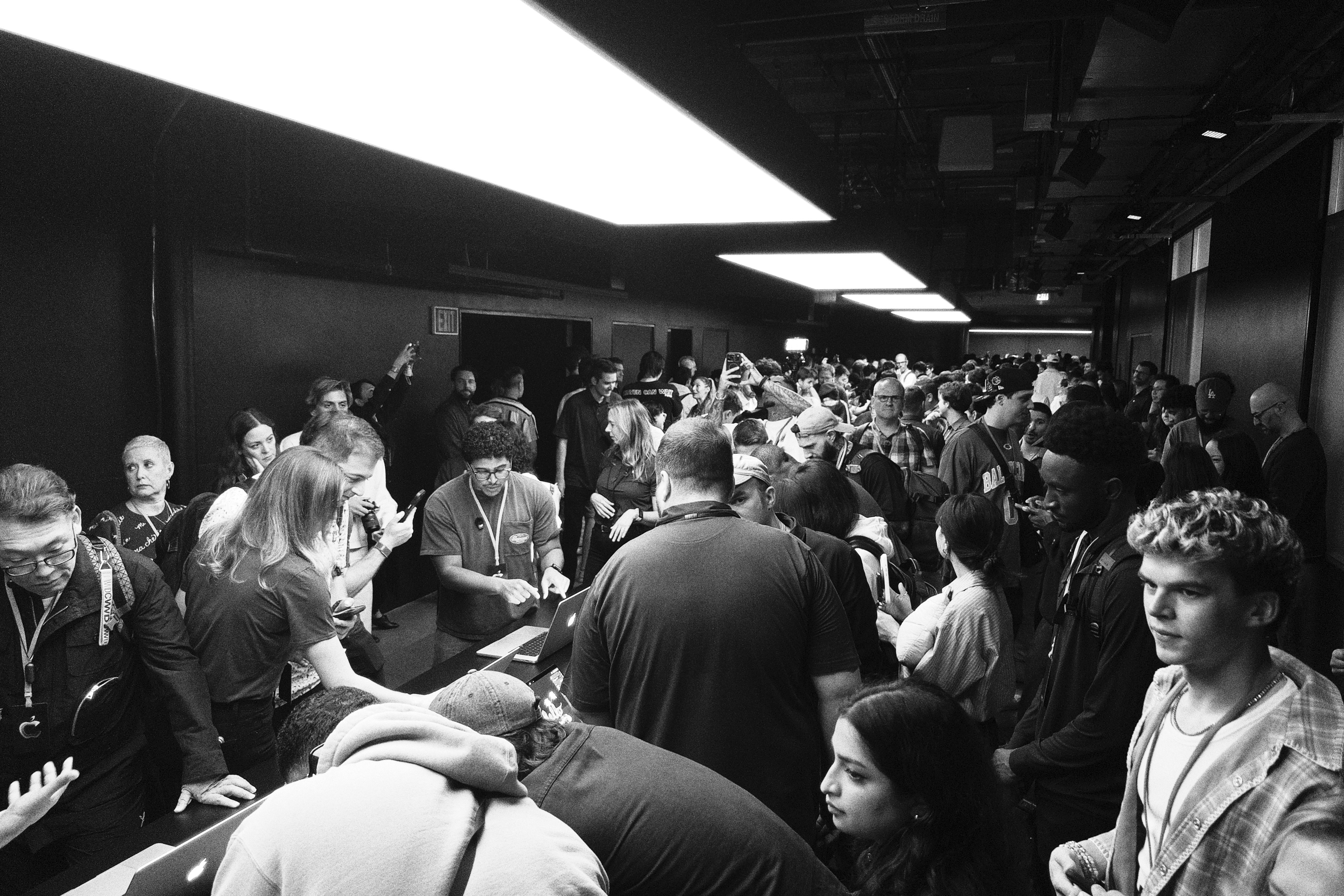
Apple held the event at Columbia Square in Los Angeles, a building opened in 1937 as CBS’s West Coast headquarters. The space was dressed in blue, matching the new laptops’ default wallpaper. After a short presentation in a standing-room theater, guests were directed to two hands-on areas containing 14- and 16-inch machines in silver and space black, with glossy and nano-texture displays.
The arrangement encouraged close inspection, though the crowd made that difficult. Both areas were busy, with attendees packed around tables as they tried the machines. Some of the M6 models looked almost identical to the more significant M5 Pro and M5 Max systems, leading a few visitors to test the M6 screens for touch. Those models did not have the new touch displays. The distinction was easy to miss in the crush, and the crowded setup underscored how much demand there was to try the OLED versions.
The event followed a format Apple had used for the MacBook Neo introduction in New York in March: short remarks from Ternus, a concise video and then a large hands-on session. The Los Angeles venue was less spacious than the warehouse used in New York, and the larger crowd left less room to talk or move around. The event worked best as a product demonstration, not as a relaxed place to compare notes.
Apple did not stream Ternus’s remarks. That is a missed opportunity. These presentations may not be conventional keynotes, but they still offer a rare chance to see the company’s chief executive speak directly about its products. The short format could work online, too, and the hands-on demonstrations show why the company chose to gather people around physical devices.
Mac workflows beyond the laptop itself
Later in the day, Apple arranged demonstrations by creative professionals using Macs in their work. The range was useful because it showed the platform in contexts where computers support a broader process: designing, capturing, processing and controlling work that may involve cameras, physical objects, equipment and software.
British filmmaking brothers Will and Ed Reid, known as The Reids, demonstrated a way to capture immersive three-dimensional scenes using nine synchronized iPhones as cameras. Their workflow uses what they call 4D Gaussian splatting. The demonstration connected familiar hardware to a more involved production process: multiple phones capture a scene together, producing material that can be used to represent it in three dimensions over time.
Portrait photographer Jeremy Cowart showed a customized studio system that can capture and process hundreds of still images per minute, with the background behind a subject changing from frame to frame. Record producer Fab Dupont mixed music live in Logic Pro. Dupont was especially interested in the new touchscreen and said he had expected to ignore it. His reaction points to a useful test for the feature: touch may appeal even to people who arrive with no intention of changing how they work.
Designers Susan Fang and Orelio de Jong presented intricate clothing and accessories made with 3D printing. Their work showed another role for the Mac: a place to design objects whose final form is physical. The collection included garments and pieces that made the link between digital tools and material craft immediately visible.
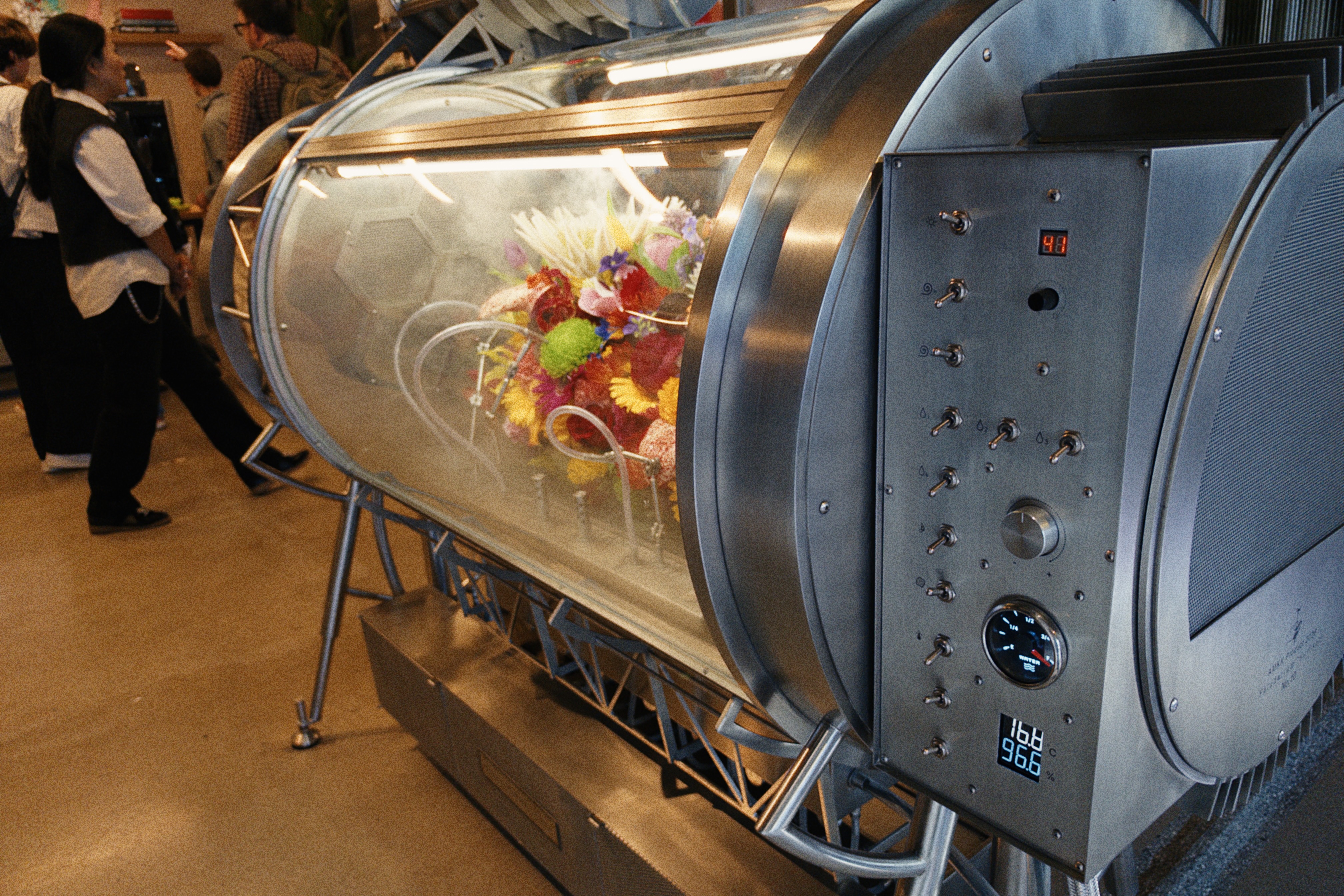
Japanese experimental botanist and florist Azuma Makoto demonstrated both botanical sculptures and equipment designed to control how cut flowers bloom. His team uses Macs to design the arrangements, engineer the machinery and operate it. The equipment included physical switches, dials and gauges. Makoto’s partner, Shiinoki Shunsuke, explained that they favor analog controls because physical controls feel appropriate for adjusting the environment around living plants. The controls make the act of changing conditions tangible, even when software and machines are doing much of the work.
That idea extended beyond a single demonstration. The equipment was designed with the same care as the floral arrangements it supported. Its controls were appealing to handle, and the machinery made clear that creative computing does not always mean replacing physical interaction with software. Sometimes the computer helps design a system whose most meaningful controls remain mechanical.
ILM shows the Mac in a film effects workflow
The most personal demonstration for some visitors came from Industrial Light and Magic. Visual effects artist John Knoll showed a practical spaceship model from Star Wars: Skeleton Crew, placed in front of an LED screen. A camera mounted on a track moved in front of the model while the screen displayed a background intended to appear in the shot.
Knoll built the camera motion system in his garage and wrote its firmware himself. He controlled the setup from a MacBook Pro. The demonstration showed a miniature spacecraft appearing to move through a rendered environment, with the camera recording the physical model and the image on the LED wall together. Instead of adding the background later, the crew could capture the combined scene in camera.
The key technique was genlock, which synchronizes the video displayed on the LED screen with the video captured by the camera. The timing has to be precise at the microsecond level, according to the explanation at the demonstration. That synchronization helps the camera record a coherent image as it moves, with the rendered background and physical model aligned in time.
The setup was a smaller version of the large LED environment ILM used for The Mandalorian in 2019. A compact arrangement for filming miniatures makes the technique easier to see: physical models, a moving camera, an LED background and synchronized image output work together as one system. The Mac’s role was not just to display an image or run an editing application. It controlled a custom rig built to coordinate the motion and timing of the shot.
For people who grew up wondering how Star Wars was made, the demonstration made a modern answer visible. Practical models still have a place, but they now work alongside digital backgrounds and precisely timed capture systems. The Mac is one part of that production chain, helping control equipment that brings physical and rendered elements together.
Why Apple gives the Mac so much attention
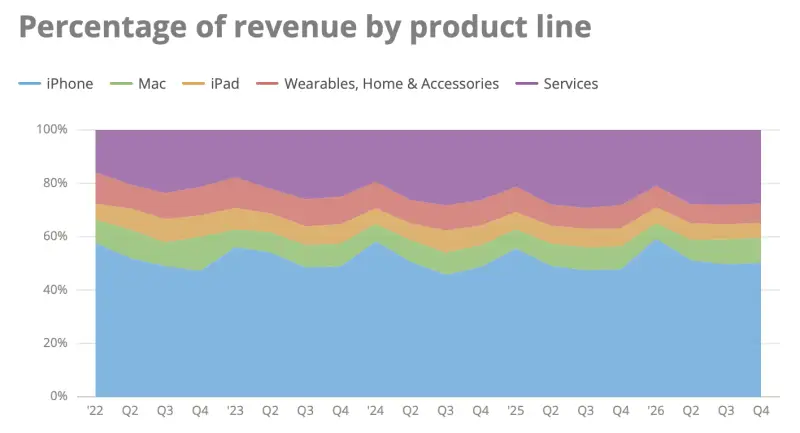
Apple held four major events in 2026, according to the account of the year: its June developer conference, the September iPhone event, the MacBook Neo introduction in New York in March and the MacBook Pro event in Los Angeles. The first two are familiar fixtures. The other two were large productions devoted to the Mac, a platform that contributes a smaller share of Apple’s revenue than the iPhone.
A chart by Jason Snell at Six Colors shows the Mac generally accounting for roughly 7 to 9 percent of Apple’s revenue in the second, third and fourth quarters over the past five years. In the holiday quarter, the Mac’s share falls to around 5 or 6 percent, while the iPhone rises to about 60 percent. The Mac is important to Apple’s product identity, but it is not the company’s largest source of sales.
That gap between financial share and attention can make two Mac-focused events look disproportionate. The Neo lowered the starting price of Apple’s laptops, while the new Pro models add a more advanced display, touch support and lower weight at a higher price. A narrow reading would treat the events as an expensive way to address a relatively small part of the business.
That misses what the Mac does for Apple’s wider product family. It remains the company’s platform for sustained, complex work, and a place where users create content with Apple devices and software. The Mac’s role is not measured only by its direct share of revenue. It supports workflows that the iPhone and other products are not designed to replace.
Apple’s history with the Mac also makes it a test of how the company handles change. The platform has adapted to new processors, displays and ways of working while retaining a recognizable desktop model. Touch could have put that continuity under pressure. Instead, Apple has added it in a way that preserves the pointer-centered interface, leaving room for people to use the new input without forcing it on everyone.
The new MacBook Pros look like an incremental update until the details are experienced together. The screen is the most visible advance; the weight reduction could be the change owners notice most often; and touch is an optional extension whose value will depend on software and habit. The illuminated logo is a lighter touch, but it fits the same pattern: Apple is changing the Mac while keeping its character intact. The next measure will be how the displays, battery life, sustained performance and touch behavior hold up beyond the hands-on room.


