Microsoft and Adobe November 2026 Security Updates: Key Risks and Priorities
- Diksha Ojha
- 398 reads
Microsoft fixes 1,235 vulnerabilities, including one exploited in the wild; Adobe patches 63 flaws across six products.
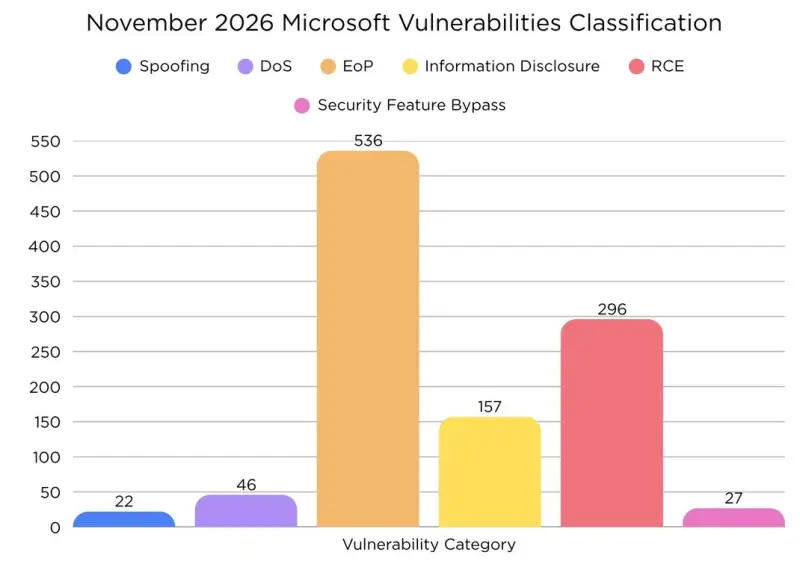
November’s security release is notable for its breadth and for one Outlook flaw that attackers are already exploiting. Microsoft says it addressed 1,235 vulnerabilities this month, including 63 rated critical and 1,029 rated important. The release also covers 142 vulnerabilities affecting the Chromium-based Microsoft Edge. Adobe issued nine advisories covering 63 flaws in six products, with four rated critical.
For security teams, the practical challenge is turning that volume into a deployment order. The figures span products with very different exposure: desktop applications, network services, cloud offerings, identity infrastructure, and Windows components. One vulnerability has been exploited in the wild, while the critical list includes numerous flaws that could permit remote code execution or privilege escalation. The Outlook issue deserves immediate attention; the broader list calls for inventory-based prioritization and a staged rollout that accounts for which products are actually deployed.
One exploited flaw leads the Microsoft response
CVE-2026-124194 affects Microsoft Outlook and is described as a spoofing vulnerability. An unauthenticated attacker can send a specially crafted message file and rely on a recipient to open it in an affected Outlook version. On opening, Outlook may connect to a network location controlled by the attacker without showing its usual warning about external content. That connection can expose authentication information, which could then be used to impersonate the user.
The sequence matters: the described attack requires a user to open the file, but it does not require the attacker to authenticate first. The missing warning also removes a signal that might otherwise prompt a user to stop. Organizations should treat the issue as a priority for Outlook users and check the applicable update status across their supported installations.
The vulnerability has been added to the Known Exploited Vulnerabilities Catalog, with a November 24, 2026, deadline for applying the fix. Microsoft reports that this is the only vulnerability in this month’s release that has been exploited in the wild. That makes it the clearest first step for triage, though it does not make the other critical issues irrelevant: several affect services reachable over a network, and some do not require authentication.
Critical flaws reach across Windows, Office, and cloud services
The critical vulnerability list covers a broad mix of attack surfaces. Several entries describe remote code execution in network-facing services; others permit a user who already has some access to raise privileges locally. That distinction is useful when setting deployment order. A remotely reachable flaw with no authentication requirement may present a different operational exposure from a local privilege escalation that depends on an attacker first gaining a foothold.
Among the network-facing Windows issues, CVE-2026-119961 affects Internet Information Services (IIS) through a race condition. CVE-2026-119958 is an out-of-bounds write in Windows LDAP, while CVE-2026-119952 affects Schannel and is attributed to an observable timing discrepancy. Windows Deployment Services has a use-after-free flaw tracked as CVE-2026-119951, and Windows Search has an out-of-bounds write tracked as CVE-2026-116928. Each is described as potentially allowing an unauthenticated attacker to execute code over a network.
Other Windows networking and discovery components also appear in the critical list. The Network Connected Devices Auto-Setup Service, Function Discovery SSDP Provider, and Function Discovery Resource Publication have issues that may be exploitable over an adjacent network. Windows TCP/IP and Network Address Translation (NAT) each have use-after-free flaws that could lead to remote code execution. Windows Message Queuing has several critical entries involving double-free, use-after-free, and heap-based buffer overflow defects. These are attributed to the service or its Queue Manager and are described as remotely exploitable without authentication.
The list also spans components used in enterprise identity and administration. Active Directory Domain Services has an improper authentication flaw that could let an authenticated attacker raise privileges over a network, as well as an incorrect authorization flaw that could permit code execution. Windows Remote Procedure Call Runtime has a cryptographic signature verification issue. Azure OpenAI and Azure Managed Grafana each have critical privilege escalation entries described as not requiring authentication. For teams using these services, the affected product and deployment configuration will determine how directly the issue applies.
Several critical issues affect applications that process user-created files or content. Microsoft Office has a heap-based buffer overflow and a use-after-free flaw; Outlook has multiple critical remote code execution entries, including heap-based buffer overflows and an invalid pointer or reference. PowerPoint has a heap-based buffer overflow, and Microsoft Defender has a null pointer dereference. The release also identifies critical remote code execution flaws in Windows Codecs Library and Windows Raw Image Extension. As with other document and media processing vulnerabilities, organizations should establish which versions and components are in use and apply the relevant updates.
Excel and Word have multiple memory safety fixes
Excel accounts for a substantial cluster of critical vulnerabilities. The listed defects include double-free, heap-based buffer overflow, stack-based buffer overflow, and use-after-free issues. The advisories group multiple CVEs under the same product and vulnerability description, so the CVE count should not be read as a count of separate patch packages. For Excel administrators, the important operational point is that several distinct flaws are addressed in this release, and the affected installations need the applicable Office update.
The Excel entries include CVE-2026-118702 and CVE-2026-118296 for a double-free flaw. Heap-based buffer overflow issues are associated with CVE-2026-118701, CVE-2026-118297, CVE-2026-124170, CVE-2026-120788, CVE-2026-120786, and CVE-2026-120789. CVE-2026-118292 and CVE-2026-118711 concern stack-based buffer overflows, while CVE-2026-118713 and CVE-2026-118730 concern use-after-free defects. The listed attack descriptions characterize these as potentially allowing unauthenticated code execution over a network.
Word has four critical entries in the supplied list. CVE-2026-110047 and CVE-2026-110067 are use-after-free flaws; CVE-2026-124185 involves use of an uninitialized resource; and CVE-2026-111285 is a heap-based buffer overflow. All are described as remote code execution risks. The release makes clear that Office should be treated as a group of separately affected applications rather than as a single uniform update: Excel, Word, Outlook, and PowerPoint each have their own listed issues.

Hyper-V and other privilege escalation targets
Windows Hyper-V has seven critical privilege escalation entries in the release. Four are use-after-free flaws: CVE-2026-119947, CVE-2026-113860, CVE-2026-113861, and CVE-2026-113864. The remaining entries cover an uninitialized resource, a time-of-check to time-of-use race condition, a heap-based buffer overflow, and an untrusted pointer dereference. The advisories describe authenticated attackers raising privileges locally.
For administrators running virtualized workloads, the key question is which hosts include the affected Hyper-V components and how updates fit into the organization’s servicing process. The listed impact is privilege escalation rather than a direct remote code execution path. That still matters in systems where an attacker could already execute code with limited permissions, since a privilege increase can expand access on the host.
Windows Graphics Kernel has multiple critical privilege escalation flaws, including an integer overflow and a heap-based buffer overflow. Remote Desktop Services has a double-free issue, while Windows TPM has a heap-based buffer overflow. Other critical entries affect the SMB Server Network Transport Driver, the Print Spooler, Windows CredSSP, and the Windows Xbox Live Networking Service. These defects vary in reachability and prerequisites, so teams should consult the applicable product advisories when mapping them to exposed systems.
Additional Microsoft issues affect developer and infrastructure tools
Outside the critical list, the release includes vulnerabilities in Visual Studio Code, Windows Installer, Windows Autopilot, and a range of Windows services. CVE-2026-121662 is a command injection flaw in Visual Studio Code that may allow code execution locally. CVE-2026-121663 is a security feature bypass involving an incomplete list of disallowed inputs. The descriptions identify an unauthenticated attacker, but the execution context and affected configurations should be checked in the relevant product guidance before assigning priority.
Windows Installer has two pairs of privilege escalation flaws: CVE-2026-119892 and CVE-2026-105501 involve incorrect authorization, while CVE-2026-119903 and CVE-2026-119398 involve improper access control. Other local privilege escalation entries affect Windows Telephony Service, Windows Text Services Framework, Windows Storage, AppX Deployment Service, HTTP.sys, Windows Management Instrumentation, Winlogon, Windows Kernel, the Print Spooler, NetBIOS, Desktop Window Manager, SMB Client, Task Scheduler, and Windows Shell.
The mechanisms in this group include use-after-free, buffer overflow, race condition, double-free, type confusion, and authorization errors. The range is a reminder that patch planning should use a product and asset inventory, not only a short list of headline CVEs. A workstation fleet, a developer environment, and a server estate may have very different exposure to the same month’s release.
There is also a denial-of-service issue in Windows TCP/IP, CVE-2026-96077, caused by a null pointer dereference. Azure DevOps Server has an information disclosure flaw, CVE-2026-112745, described as server-side request forgery. These risks have different outcomes from code execution or privilege escalation, but they still warrant review where the affected products are deployed.
Release totals and product coverage
Microsoft’s release summary reports 1,094 vulnerabilities across the product families in its table, compared with the headline figure of 1,235 vulnerabilities across the month’s updates. The table lists Windows with 726 vulnerabilities, Office with 174, SQL Server with 59, Developer Tools with 53, SharePoint Server with 27, Other with 25, Azure with 20, Exchange Server with nine, and Defender with one. It also lists 53 distinct updates in total, including 28 for Developer Tools, 13 for SQL Server, seven for Office, three for SharePoint Server, and one each for Defender and Exchange Server.
The two totals are reported in separate parts of the release, so teams should use the relevant product advisories and their own asset data to determine what applies. Microsoft also says that 142 vulnerabilities affect Chromium-based Edge. Those Edge issues add another product surface to check, particularly for organizations that manage browser updates separately from operating system and Office servicing.
For deployment planning, the product-family figures help identify where the volume sits, but they do not establish the risk to a particular organization. A smaller count in a service used across critical infrastructure may deserve earlier attention than a larger count in a product that is absent from the estate. The exploited Outlook issue is the strongest immediate signal in this release; network-facing critical flaws and systems with exposed services should follow based on local configuration and reachability.
Adobe fixes span creative applications and Experience Manager
Adobe issued nine advisories addressing 63 vulnerabilities across After Effects, Photoshop, Premiere, Audition, Adobe Experience Manager (AEM), and Dimension. Four vulnerabilities are rated critical. Adobe says successful exploitation could lead to arbitrary code execution. The supplied release does not identify the affected product versions, individual CVE details, or deployment requirements, so teams should use Adobe’s advisories to match the fixes to their installed versions.
The mix includes desktop creative applications as well as AEM, which may be operated as a server-side platform. Those products have different update workflows and user populations. A practical response is to map each advisory to the versions in use, identify who owns updates for each product, and prioritize the affected systems according to their exposure and the severity Adobe assigned.
Vulnerability detection and remediation workflows
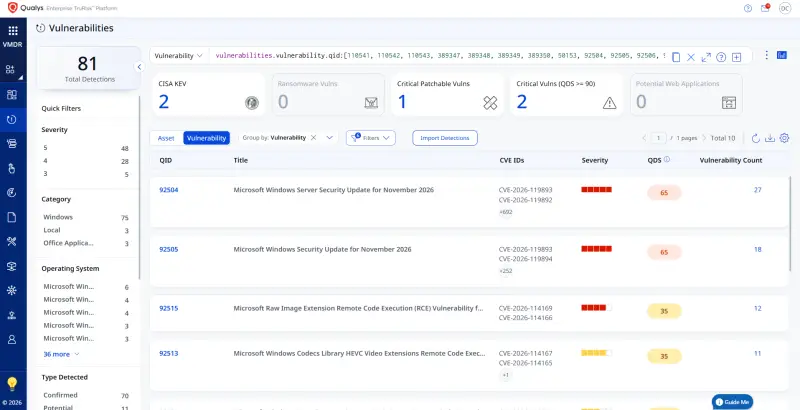
The release describes Qualys VMDR as detecting new Patch Tuesday issues through updates to its Knowledgebase. It provides a QQL query for finding affected hosts using vulnerability QIDs 110541, 110542, 110543, 389347, 389348, 389349, 389350, 50153, and 92504 through 92515, with 92510 omitted from the supplied sequence. The query is intended to surface hosts associated with those vulnerability identifiers; administrators still need to validate results against their installed software and patch status.
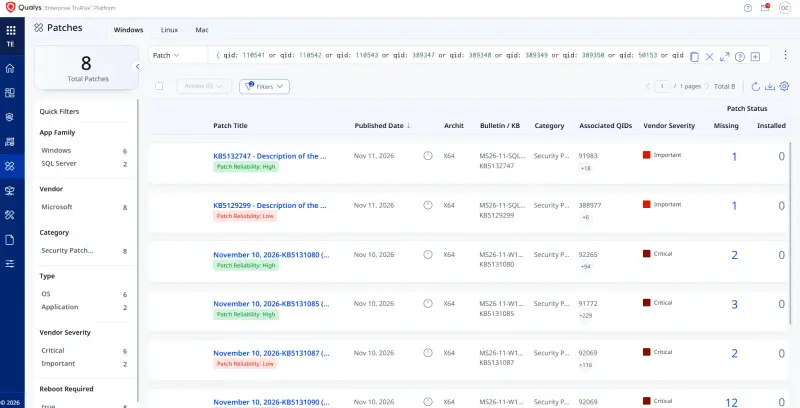
A separate query is provided for finding missing patches in the Patch Catalog. It uses the same QID set, with the QIDs expressed as an OR condition. The described workflow is to select the relevant QIDs, filter for missing patches, and deploy applicable updates. That can reduce the manual work of correlating findings with available patches, but deployment still needs to fit the organization’s change process and compatibility checks.
The release also describes Qualys TruRisk Eliminate mitigations for 537 vulnerabilities. The proposed mitigations adjust configuration through registry keys and, where relevant, service policy files. The affected components span Windows services and drivers, networking and storage components, Office applications, SharePoint Server, and Exchange Server. Examples named include Hyper-V, HTTP.sys, Message Queuing, Print Spooler, SMB Client and Server, Windows Search, the Codecs Library, Remote Desktop components, and Office applications such as Word, Excel, PowerPoint, OneNote, Outlook, Access, and Visio.
According to the product description, the mitigations cover remote code execution, privilege escalation, information disclosure, denial of service, spoofing, tampering, and security feature bypass. They are presented as a way to reduce risk while teams work toward remediation. Configuration changes can affect service behavior, so administrators should understand the component affected and validate any mitigation against their environment before applying it broadly. Qualys says its TruRisk Mitigate customers receive the scripts as part of the monthly signature set.
Qualys also says its InstaScan findings were available to customers 40 minutes before Microsoft’s advisory page was updated. That is a vendor claim about the timing of its detection results. For teams using vulnerability management tools, the practical value of earlier visibility depends on whether findings map cleanly to their assets and whether the organization can verify and act on them.
What to prioritize next
Start with CVE-2026-124194 on Outlook because it is the one vulnerability in the release reported as exploited in the wild. Then identify systems affected by critical remote code execution flaws, especially network-facing services and components that are reachable from untrusted network segments. Review Office applications, Windows services, and cloud products against the actual deployment inventory, and include Adobe products in the same cycle where they are present.
The release is broad enough that a single severity-based queue will not reflect every organization’s exposure. Authentication requirements, network reachability, user interaction, service role, and available mitigations all affect the order of work. The next Microsoft Patch Tuesday is scheduled for December 8, 2026. Until then, the useful measure of progress is whether the exploited Outlook issue and the critical flaws in deployed, reachable components have been identified, patched, or otherwise addressed.


