November 2026 Patch Tuesday: Prioritize 1,252 CVEs With Staged Rollouts
- Pauline Bacot
- 326 reads
November’s 1,252 CVEs call for early exposure checks, patch reliability review and staged deployment with mitigations when updates fail.
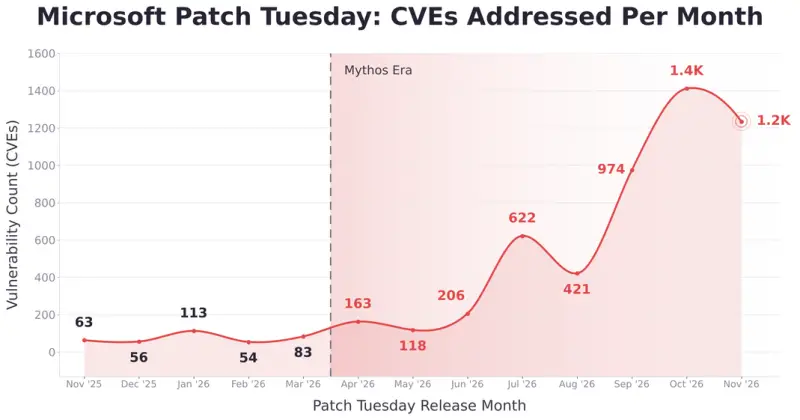
November 2026’s Patch Tuesday addressed 1,252 CVEs, a volume that makes “patch everything now” an impractical plan for most IT teams. The useful response is to find exposed systems early, judge whether updates are likely to hold up, and stage deployments according to risk and operational impact.
That approach matters because speed carries two kinds of risk. Delayed fixes give attackers more time to exploit disclosed flaws, while a faulty update can disrupt services such as Exchange or business applications. November’s release brought both concerns into focus: several vulnerabilities warrant prompt attention, and some updates have reported compatibility and installation problems.
A much larger patching workload
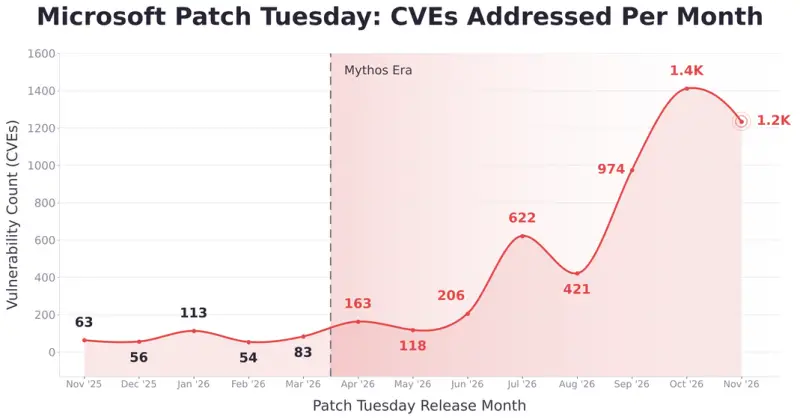
Microsoft addressed 63 CVEs in November 2025. By November 2026, the monthly count had risen to 1,252, nearly 20 times as many. Since April 2026, Microsoft has averaged roughly 650 CVEs per month, compared with about 74 per month between November 2025 and March 2026. Each of the last three releases covered close to 1,000 CVEs or more.
The figures describe a workload that manual processes can’t absorb at the same pace. A team can’t review and deploy updates twenty times faster simply by trying harder. Prioritization needs to account for exploitability, asset exposure, patch reliability and the consequences of a failed update.
Start with exposed, high-risk systems
Several November vulnerabilities stand out. CVE-2026-124194 affects Outlook: opening a crafted message file can bypass the external-content warning and disclose a user’s NTLMv2 hash to an attacker-controlled server. The flaw is rated Moderate, but it’s being exploited in the wild, so severity alone doesn’t capture its urgency.
CVE-2026-118207 is a Critical remote code execution flaw in on-premises Exchange Server. An authenticated attacker with low-level access can run code, and Microsoft rates exploitation as more likely. CVE-2026-118146 affects Active Directory Domain Services: a crafted request from a low-privileged user could execute code on a domain controller, with exploitation also rated more likely.
Other recurring pressure points include Office and Outlook Preview Pane remote code execution flaws for a third consecutive month, a new zero-click Windows Search remote code execution flaw, and additional Hyper-V escapes. For defenders, the practical priority is to map these issues to exposed and important assets, then set rollout order around the consequences of exploitation.
Know your exposure as updates arrive
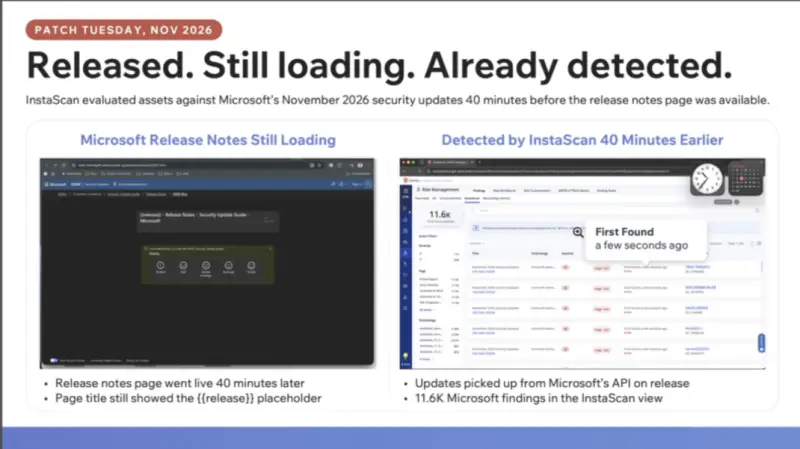
Qualys says its InstaScan service detected Microsoft’s November updates through Microsoft’s API as they were released on November 10. It began evaluating customer assets roughly 40 minutes before Microsoft’s public release notes page finished loading. In that interval, the service identified more than 11,000 Microsoft findings, each marked as newly discovered.
Early asset visibility gives teams time to plan change windows, identify critical systems and organize deployment rings while details are still emerging. Qualys says InstaScan uses inventory and telemetry already collected by Qualys Agent Insta, so customers don’t need to run a new scan for this assessment.
The timing is useful, but an early finding is only the start of the work. Teams still need to confirm which affected machines matter most, whether the update applies to their software and configurations, and how to handle a patch that might cause an outage.
Check patch reliability before broad deployment
As of 3 p.m. Mountain Time on November 11, about 35% of November’s patches had a Low reliability rating in Qualys’s Patch Reliability Assessment. The rating draws on public signals, including vendor knowledge base entries, advisories, Linux release notes and administrator forums, alongside Qualys telemetry from more than 500 million deployed patches. That telemetry includes rollback and vulnerability-reopen rates.
A Low rating isn’t a reason to leave a vulnerability unpatched indefinitely. It’s a reason to test the update against the systems and dependencies that could be affected before broad deployment.
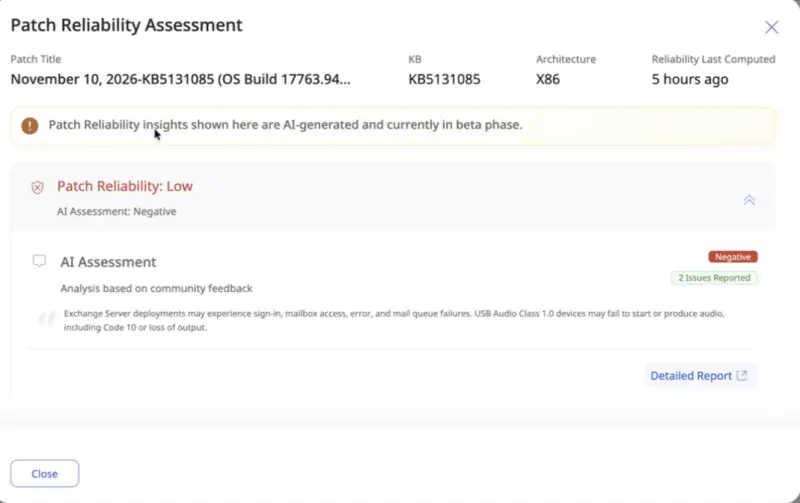
One example is KB5131085, a cumulative update for Windows 10 and Windows Server 2019, OS Build 17763.9487. Microsoft rated it Critical; it addresses CVE-2026-119892 and 574 other CVEs. Yet community reports identified two possible problems: Exchange Server installations may experience sign-in, mailbox-access and mail-queue failures, while USB Audio Class 1.0 devices may fail to start or lose audio output with Code 10.
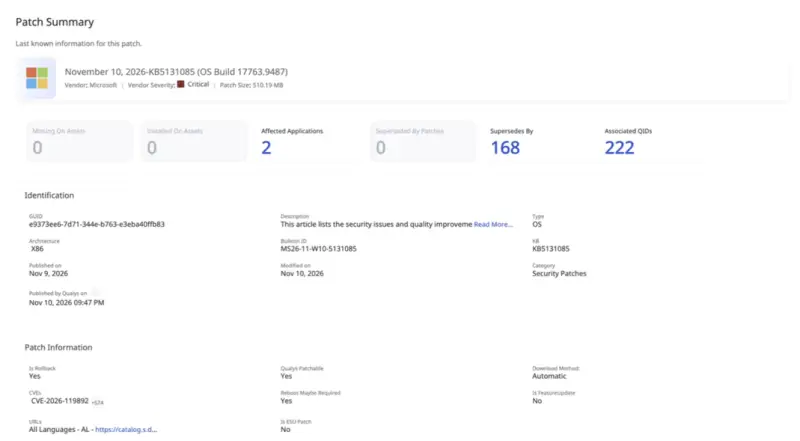
For organizations running Exchange on Server 2019, the update creates a specific trade-off: it addresses a critical security issue while carrying reports of problems with the messaging service. Testing that configuration in a pilot group can reveal whether the reported impact applies locally before the update reaches the wider environment.
Other recent vendor-confirmed problems show why teams need to check each update’s history. November’s SQL Server update KB5129299 can cause access violations when querying sys.dm_exec_requests during recovery; no fix was available in the source material, though a trace-flag workaround was noted. An October .NET Framework update for Windows 11, KB5127694, may fail to install with error 0x800F0922 and roll back after reboot.
Use rollout stages that reflect operational impact
A practical deployment sequence separates urgent exposure from routine maintenance. First address proven high-risk cases, including vulnerabilities on CISA’s Known Exploited Vulnerabilities list, publicly exposed assets and flaws that could be automated to gain broad control. Then automate high-reliability updates with limited operational impact, such as browser or standalone utility patches on non-critical systems that don’t need a reboot.
Updates to shared runtimes, dependencies and critical assets deserve a pilot ring. Start with a small, representative group that includes configurations most likely to fail; for KB5131085, that means testing Exchange servers running Windows Server 2019. Expand deployment only after the update behaves as expected in that environment.
Low-reliability updates, vulnerabilities without an available fix and end-of-life software may call for a temporary mitigation. Removing unused applications, bloatware and residual files can also reduce the number of components that need patching and the system’s attack surface.
Qualys describes its TruRisk Eliminate product and Agent Sara as tools for building these remediation waves, sorting fixes by risk, operational impact and patch reliability. The product can route updates to automated deployment, staged rings or mitigation workflows. The same sequence can also be implemented through an organization’s existing tools and change process; the key is matching the rollout to the risk and likely blast radius.
Mitigate when a critical update can’t install
Testing can confirm that a critical update breaks a service the organization depends on. Rolling back and waiting for a fix leaves the vulnerability open; deploying anyway risks an outage. A compensating control offers an interim response by closing or limiting the vulnerable attack path without installing the update.
Depending on the flaw, that could mean disabling a vulnerable service or feature, changing a configuration or registry setting, or isolating an exposed asset. Track which systems are protected this way, keep the mitigation in place until a fixed update is available, then install the update and remove the temporary control.
November’s KB5132061 illustrates a separate deployment obstacle. Microsoft confirmed that its Windows 11 security update may fail on some devices that installed the October 2026 preview update KB5127936. Affected devices may repeatedly retry or return errors 0x80070306, 0x800f0989 or 0x800f0993. Microsoft said the issue should resolve automatically within 24 to 48 hours of November 11, and advised administrators to contact support if it persisted.
Until the update succeeds, affected devices miss the November fixes. Repeated retries won’t address the exposure in the meantime. Teams can identify devices with KB5127936, apply mitigations first to the most critical vulnerabilities—especially those on CISA’s KEV list or rated more likely to be exploited—and install the November update once Microsoft’s repair takes effect. The temporary controls should then be retired.
The working pattern is straightforward: identify affected assets early, check reliability and compatibility signals, deploy low-impact updates automatically, and test high-impact changes in rings. When a patch fails or can’t be applied safely, mitigation buys time—but it needs an owner and a clear path back to a patched state.


