How to Spot Fake Advent Calendar Stores Before You Buy
- Thomas Davis
- 444 reads
Copied storefronts use fabricated reviews, resetting countdowns and questionable product claims. Check the seller, product details and payment options before buying.
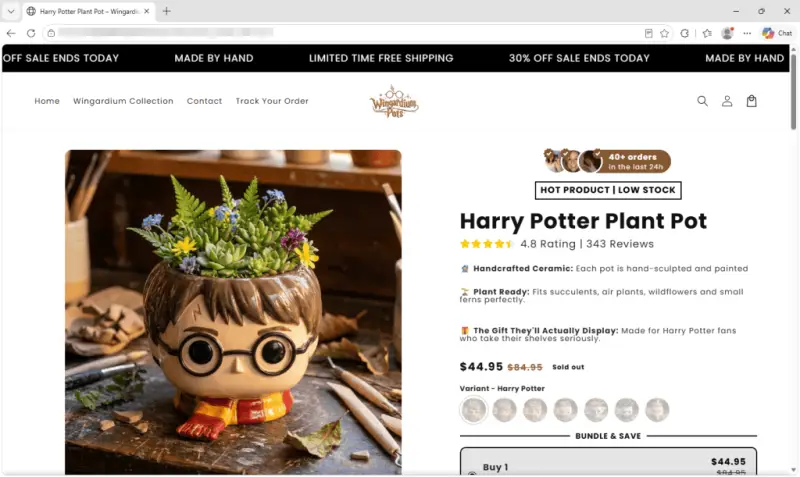
Resetting countdowns, handwritten reviews and product descriptions that contradict themselves are stronger warning signs than a flashy discount is evidence of a real deal. A review of online advent calendar sellers found stores using copied website designs, questionable product claims and little information about who operates them. Some appear to sell inexpensive goods at steep markups; the evidence doesn’t establish that all the stores share an owner.
A template built to create urgency
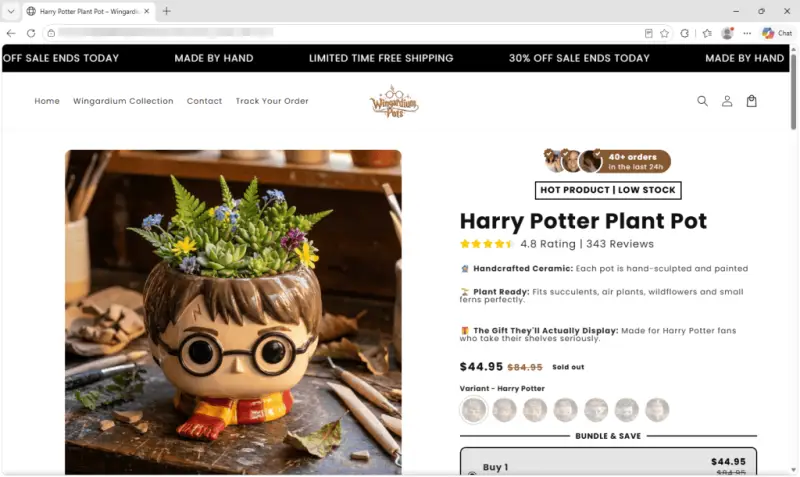
The stores examined sold a mix of products: a Legend of Zelda music calendar, a Michael Jackson music calendar, a Lord of the Rings figure calendar, Harry Potter character plant pots and a Metallica calendar. Other sites offered fishing lures, squishy toys, charm bracelets and wearable jumpers. Many followed the same sales pattern, even when the products differed.
Each store focused on a single product and framed its page with urgency cues: a sale said to end that day, warnings about low stock, a five-minute cart timer, a count of orders placed in the previous day, and star ratings backed by thousands of reviews. Testimonials carried “verified buyer” labels and timestamps such as “three hours ago.”
Those signals weren’t connected to an active review system. Ratings, review totals and testimonials had been added manually to the store theme. Timestamps stayed fixed, while countdowns restarted, in some cases every day. A sale timer that keeps returning doesn’t show that stock is running out or that a price is temporary.
The checkout pages used Shopify, but that alone says nothing about whether an order will arrive or match its listing. The investigation found no evidence that the pages were built to steal card details. The supported concerns are misleading sales claims and the chance of receiving nothing, or a product substantially different from what was shown.
Some checkouts also offered optional charges for shipping protection, skipping a queue or adding a mystery gift. At one store, those extras came to nearly $35. Buyers should check the final total carefully, especially when a product page has already used timers and scarcity prompts to rush a decision.
One music calendar makes incompatible claims
The Zelda calendar listing described 25 discs, each said to contain a small chip holding track data. It claimed that an included player could read those chips and play music through a built-in speaker without an app, subscription or Wi-Fi. Elsewhere, the same page said the discs worked with Spotify, Apple Music and YouTube, and could be linked to new songs through a chip-writing app on a phone.
Those explanations don’t fit together. A player with no network connection can’t stream tracks from those services. And if a phone app can assign a new song to a disc, the chip appears to store a link to the music rather than the music itself. Research into the legitimate version of this product found that its chips hold links, while a phone plays the tracks. The listing instead paired that mechanism with claims of a standalone speaker.
The bundle prices also conflicted with the advertised savings. Two offers claimed discounts of $15 and $33, while the listed prices implied savings of about $19 and $43. Inconsistencies like these are a reason to pause and verify how a product works before paying.
Signs of copied storefronts, without a confirmed owner
The stores had different names but closely matching layouts and the same version of a commercial theme. Their theme files shared an internal fingerprint, suggesting the files had been copied. Some sites also blocked right-clicking and access to developer tools.
Leftover details exposed further connections and poor editing. One theme retained a filename containing another store’s web address. Other pages still included text from an earlier shop, such as a warranty for costumes that fail to inflate and a banner instructing the seller to “use code X for X percent off.”
Store files were timestamped from mid-July through the second week of September; the newest store was only days old when examined. Most merchant accounts were registered in Romania, while prices appeared in dollars. None of the calendar stores checked listed a business address or phone number.
Product images from two stores triggered a provenance checker for a watermark indicating use of OpenAI tools. Image filenames across three stores followed the same automated naming pattern, and one store’s full set of product photos shared a timestamp from a single afternoon. These details support questions about how the images were made and whether the products are represented accurately; they don’t identify who made the stores.
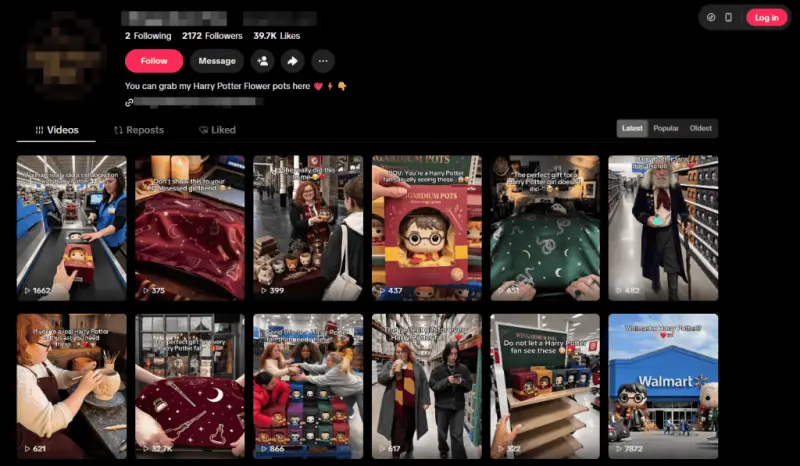
A TikTok account using one store’s branding linked directly to its product page and claimed the store was working with Walmart. Videos showed retail scenes, including a large character figure outside a store and pallets of branded boxes. No evidence of that arrangement was found, and some scenes did not appear real. Together with shared design elements and the filename connecting two shops, the material points to a possible operator or closely connected group, but it doesn’t prove who is behind the sites.
Checks to make before checkout
Start by assessing whether the offer remains consistent across the page. Search for the product type and learn how a legitimate version works. If its stated features contradict the underlying technology, or the savings don’t match the listed prices, treat the page with caution.
- Ignore countdowns and low-stock notices as evidence of demand when they reset or never change.
- Search for the seller independently instead of relying on a link in a social video. Look for a business history and customers beyond the store’s own site.
- Verify claims that a product is stocked by or connected to another brand. A seller’s video alone doesn’t establish that relationship.
- Look for a business address, company registration and working phone number. Their absence makes it harder to resolve an order problem.
- Use reverse-image search to see whether product photos have appeared elsewhere. No results can be informative, particularly when the images look unusually polished.
- Read the small print, including warranty language. Text about inflatable costumes on a calendar listing suggests the page may have been recycled.
- Check spelling in product names and packaging images. The stores examined included a misspelled artist name, garbled savings copy and “calindar” on packaging artwork.
- Choose a payment method with buyer protection. A credit card or payment service may provide a route to a refund; a bank transfer can be harder to reverse.
In a survey earlier in the year, 22% of respondents said they had been misled by AI-generated photos or product reviews. That figure reinforces the value of checking a seller’s claims and images instead of treating polished presentation as proof.
Browser tools can also help when a suspicious link appears in a feed. Malwarebytes Browser Guard blocks scam sites, while Malwarebytes Scam Guard checks links, messages and screenshots. Its Scam Number Check can help assess follow-up calls or texts about delivery fees, customs charges or refunds. Whatever tools a buyer uses, the most useful first step is to slow down when a page relies on urgency and verify the seller before paying.


