Chrome 157 Update Fixes 83 Security Flaws, Including Five Critical Bugs
- David Rodriguez
- 955 reads
Chrome 157.0.8103.78/.79 includes 83 security fixes, five for critical use-after-free flaws. Users can check for the update manually.
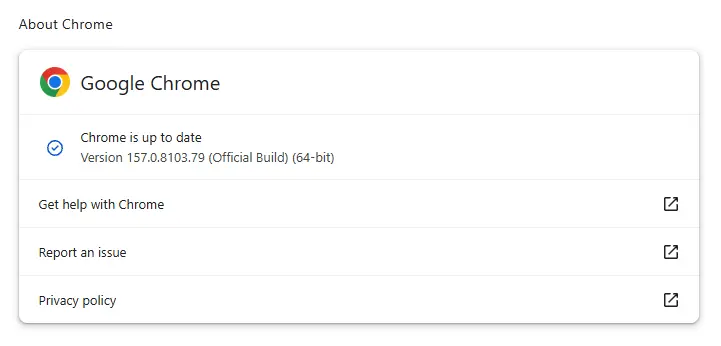
Chrome’s latest desktop update fixes 83 security flaws, including five rated Critical, and arrives just two days after the previous update. Google issued the Stable channel release on November 11 for Windows, Mac, and Linux. The staggered rollout may take days or weeks, so users who need the fixes sooner can check for the update manually. That short gap makes the release worth a closer look: it shows that a recent update doesn’t necessarily mean a browser is current.
The release moves Chrome to versions 157.0.8103.78/.79 on Windows and Mac and 157.0.8103.78 on Linux. Google hasn’t provided further detail here about the individual fixes, which limits what users can infer about their exposure. The five Critical issues share a common category: use-after-free memory errors. That points to the kind of programming mistake involved, but the severity label alone doesn’t establish how each bug could be triggered, whether it requires a particular sequence of actions, or what access it might expose.
Why use-after-free bugs matter
Programs use memory to hold objects and the data associated with them. When an object is no longer needed, software can release that memory so another part of the program can reuse it. A use-after-free flaw occurs when code still tries to access the old object after its memory has been released. The mistake is about timing and ownership: the memory is available for reuse, but some code still behaves as though the original data is there.
The reference left behind is often called a dangling pointer. The problem usually comes down to software losing track of who controls an object’s lifetime: one part of a program frees it while another still expects it to be valid. Faulty error handling can create that mismatch, as can timing between tasks running at the same time. In a large application such as a browser, many components handle different kinds of work, so keeping object lifetimes straight is an ongoing engineering challenge.
Once memory has been freed, its contents can change. Depending on how the affected component behaves, a stale reference can lead to a crash, corrupted data, or an information leak. In some cases, an attacker who can shape what occupies the released memory may be able to influence how the program interprets it. That possibility is conditional, though: whether such a path is practical depends on the specific flaw, the browser’s protections, and the circumstances in which the vulnerable code runs.
That range of possible outcomes helps explain why use-after-free bugs can receive a Critical rating. But the category describes the underlying memory-management mistake; it doesn’t mean every such flaw has the same impact. For these five Chrome fixes, the available details don’t identify the affected components or explain the conditions needed to trigger them. Those specifics would help security teams judge which browser workflows deserve attention and assess exposure beyond the broad severity rating. Without them, the right reading is measured: the fixes address serious classes of defects, while the public notice leaves the mechanics unclear.
Check whether Chrome has updated
Chrome normally installs updates automatically, but the process can be delayed if the browser stays open for a long time or an extension interferes. A background download still needs the browser to complete its update process, so a browser that remains open may not finish applying a release promptly. Because this release is rolling out gradually, an automatic check may not offer the update to every user immediately. If you’re responsible for several devices, checking version numbers can provide a clearer picture than assuming the rollout has reached them all.
To check manually, open About Google Chrome from the browser’s Settings or Help menu. Chrome will look for an available update and download it. If the browser asks to relaunch, do so to finish applying the update. The relaunch matters: downloading an update and running the updated browser aren’t the same thing.
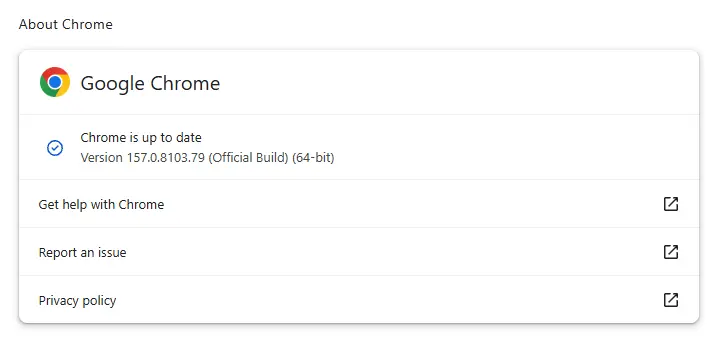
The release details are available in Google’s Chrome Stable channel update notice. For users and administrators, the practical takeaway is straightforward: check that desktop Chrome reaches the listed version, then restart the browser if prompted. The short interval between this and the previous release also makes it sensible to keep the update process active rather than assume a recently updated browser already has these fixes. The numbers here are underwhelming as a guide to individual risk; 83 fixes and five Critical ratings convey scale and severity, but not which users face a reachable attack path.
What the release signals
This is more significant than it looks because browser updates sit at the intersection of software maintenance and everyday security. Chrome is often left running across long work sessions, and users may treat an update notification as a minor interruption. Here’s the thing: the useful action is simple, but it depends on finishing the process—checking for the release and relaunching when asked. The two-day interval also argues for treating each release on its own terms, rather than using the date of the last update as proof that the browser is current.
For administrators, the missing component-level detail leaves a narrower basis for prioritization. They can confirm whether managed desktops have reached the listed versions, while the public notice doesn’t support a more specific assessment of which systems or browsing patterns are most exposed. (And this is the part most people overlook.) A version check tells you whether the fix is installed; it doesn’t explain the vulnerability’s trigger conditions. For users, the practical response remains clear: check Chrome and complete the relaunch if one is offered. No more detail than the release notice supports. If you’re working in this space, that gap between a clear update action and limited public exploit context is a reminder to track both deployment status and the technical information Google publishes.


