Reflex Uses Headless Tests to Keep Native iOS and Android Apps in Sync
- Robert Smith
- 939 reads
Reflex lets agents inspect and drive app logic without a simulator, using one behavior test suite for both native platforms.
Reflex tackles a practical bottleneck in agent-written mobile software: checking whether a screen behaves correctly can take far longer than generating its code. Its approach moves most behavior checks out of the simulator. Agents inspect and operate each screen through a structured interface to its ViewModel, while one suite of behavior tests runs against both native iOS and Android implementations.
The architecture comes from Shopify’s move toward building its mobile apps in Swift and Kotlin. Its premise is that writing the platform code twice can be workable when agents help with implementation, provided teams have a dependable way to keep behavior aligned. Reflex shares that verification layer rather than the app code. The result is a faster feedback loop, with a deliberate tradeoff: it checks application behavior directly, but it doesn’t replace visual review or tests that need to examine rendered pixels.
Reflex is built around four elements: a UI-free core, a consistent ViewModel pattern, a JSON interface that exposes each screen’s state and actions, and a command-line tool that drives that interface. The core can run without a phone or simulator, and the same test description can exercise both platforms. Shopify reports that more than 1,700 behavior tests run on each platform in about four minutes on CI.
Move feedback from the screen to the app’s logic
A conventional automated mobile test often has to build or launch the app, start a simulator, find controls, perform taps, and wait for the interface to settle. That gives teams a view of the application as a user sees it, but it also makes each test slower and failures harder to diagnose. A test may leave an engineer or agent with screenshots or a video to inspect before the underlying problem is clear.
Reflex narrows the loop. An agent can ask the app what screen is active, read that screen’s state as JSON, and invoke one of its available actions. The command-line interface has two basic operations: ls displays the focused screen, its state, and the actions it accepts; do Action [json] invokes an action, optionally with a JSON payload.
The commands work against either a headless core process or a running mobile build. In both cases, the CLI addresses ViewModels rather than tapping the rendered interface. A real build can still update on screen as commands run, because its views observe the same state the commands change. The test path itself doesn’t need to interact with those views.
The simplicity is intentional. There’s no terminal interface with menus or visual effects. That keeps attention and development effort on the parts an agent needs: discover what it can do, issue an action, inspect the new state, and respond to a clear failure.
Share behavior tests across two native apps
Reflex’s cross-platform strategy starts with a choice to keep the implementations native. The iOS app uses Swift and its own interface toolkit; the Android app uses Kotlin and its corresponding toolkit. They don’t share an intermediate app layer.
That means two implementations of each screen. The reasoning is that an abstraction layer has ongoing costs of its own: teams must maintain it, account for platform differences it can obscure, and deal with its needs during platform updates. With agents contributing much of the code, the authors argue, reproducing a ViewModel on both platforms can cost less than maintaining a bridge between them.
But two implementations need a common check. Reflex makes the test suite that shared artifact. Every behavior test runs against both apps, and the team’s process prevents a change from passing on just one platform. That creates a direct check on whether the two versions still behave alike, even though their code is separate.
Other testing options cover some of the same ground, but each has a limitation for this goal. Cross-platform end-to-end tests can exercise both apps, and Shopify says it uses them for selected user flows. They still need a simulator or emulator and, in the team’s experience, don’t provide the speed it wants for agent feedback and CI. Native UI tests using XCUITest and Espresso can be faster and more dependable, but they are tied to a simulated device and require separate tests for each platform.
Unit tests are quick, but the team sees a parity problem there too. Separate Swift and Kotlin suites can drift, and a test close to implementation details doesn’t necessarily show that both apps cover the same user journey. Reflex places its main behavior checks between unit and UI testing: the test sees the state and actions available to the screen, while the real reducers, services, GraphQL client, and navigation remain in use.
That’s why the authors describe the approach as grey box testing. The test doesn’t inspect pixels, but it also doesn’t test a mock version of the app. Fixtures stand in at boundaries where the app would otherwise depend on a network response or a device capability. The behavior under test remains the app’s own logic.
A core that can run without mobile UI
The architecture divides each platform’s app into a Core module and a Mobile module, with a CLI host alongside them. Core contains the parts that don’t require a rendered interface: ViewModels, services, navigation state, GraphQL, persistence logic, and deep-link handling. On iOS it is a Swift package; on Android it is a plain JVM module. Neither imports platform UI frameworks such as UIKit or Android APIs.
Mobile owns the interface and device integrations: SwiftUI or Compose views, Keychain access, push notifications, the camera, and the share sheet. It depends on Core, while Core has no knowledge of Mobile. The CLI depends on Core in the same way, but runs on macOS or the JVM and supplies fixtures in place of device services.
Core declares protocols for the capabilities it needs. The mobile app or CLI supplies concrete implementations when it constructs Core, using ordinary dependency inversion rather than a dedicated injection framework. This gives the same application logic different hosts: a phone with platform services, or a command-line process with controlled fixtures.
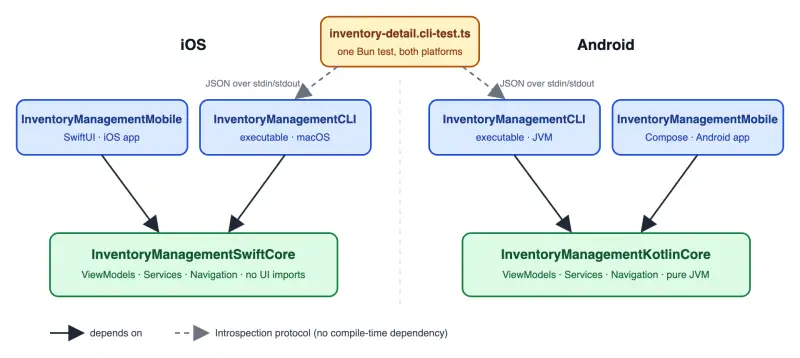
Navigation is part of Core as well. A navigator represents the routes on screen as state, so a CLI can move through the app without creating views. The same arrangement supports deep links. On Android, behavior tests can run on the JVM instead of an emulator; on iOS, the Swift core can run on macOS.
Headless execution also removes layout, animation, and view-loading delays from behavior tests. Shopify says its 1,700-plus tests finish in about four minutes on CI on both platforms. The reported timing is for the team’s setup, but the underlying mechanism is clear: an action is a call into a ViewModel, and checking the result is a read of its JSON state.
External inputs are passed as constructor arguments. A test can provide GraphQL responses, stored credentials, biometric availability, or feature flags before the app logic runs. To test an edge case, it supplies different input data rather than changing a mock during the test. Reflex itself has no third-party dependencies; keeping Core free of platform imports is the main constraint teams have to enforce.
Give every screen the same state-and-action shape
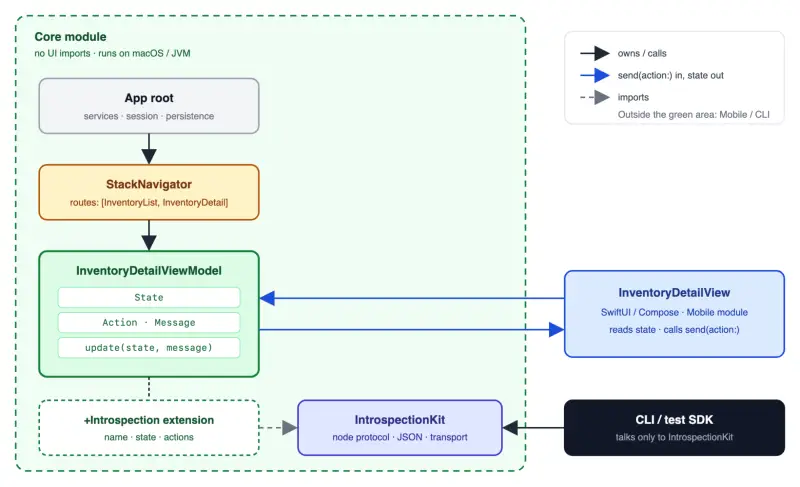
Inside Core, the app is a tree of regular objects. The root app object owns such things as the network client, session, and persistence. Navigators for tabs, pushed screens, and modals hold the active routes. A ViewModel sits at each screen in the tree.
The view has a narrow relationship with its ViewModel: it reads state and calls send(action:). It doesn’t call arbitrary ViewModel methods or modify state itself. That boundary draws on the Elm architecture, with one central reducer controlling how the app responds.
- State contains what the screen presents. The ViewModel owns it, and the view reads it.
- Action defines the requests the view or CLI can make, usually as cases in an enum.
- Message is the ViewModel’s internal input. It wraps view actions and carries results returned from services.
update(state, message)is the reducer and the sole place where state changes.- Services handle effects such as network and storage operations. Constructor-supplied protocols let the CLI provide fixtures.
This structure makes the behavior surface predictable. A button tap and a CLI command both enter through send(action:), and both feed the same reducer. An agent can repeat this pattern across screens without inventing a different test interface for each feature.
Expose ViewModels through an introspection contract
Introspection Kit defines how an outside process reads a ViewModel and requests actions. Each screen provides a node that exposes a stable name, its current state encoded as JSON, the actions it accepts, and an optional child node. The CLI and test SDK use this contract; the app’s normal runtime doesn’t depend on it.
There’s a small language-specific difference. Swift can add the introspection behavior through an extension. Kotlin extensions can’t make a type implement an interface, so Android uses a separate introspection-node class next to the ViewModel. In either case, removing the introspection layer leaves the app able to build and run, while removing the terminal control surface.
Each action entry has a title and a closure that calls send(action:). Actions can accept input: for example, setting an inventory quantity can take a typed value. The @IntrospectionInput macro generates a JSON schema from an input type’s properties. That lets the CLI explain the required shape and reject malformed data before it reaches the ViewModel, without maintaining a separate schema by hand.
The contract follows three useful rules. If a user can see something, it belongs in state; if they can do something, it belongs in actions. The node itself doesn’t reproduce interface logic or add conditions. Whether an attempt to decrement zero stock changes anything is decided by the ViewModel reducer, and the resulting state communicates what happened. Finally, every requested action must pass through send(action:). The CLI can’t perform an operation that the screen itself couldn’t request.
That same interface can support more than testing. Shopify says its Sidekick assistant uses the state-and-actions surface to act inside the app. An agent in the terminal and an assistant in the product can therefore use the same capabilities without a second integration layer.
Represent navigation as a tree
Introspection nodes mirror the app object tree. The root node points to a navigator, which points to the ViewModel for the top route. The CLI follows those child links and focuses on the deepest node—the screen that’s currently active.
Some containers can pass specific actions down to that focused screen. A stack navigator can make a back action available, for example, and a tab navigator can offer tab selection. A regular screen ViewModel doesn’t pass actions along. If a command asks for something that isn’t available on the focused node or offered by a parent container, the CLI declines it and reports the actions that are available.
This keeps the CLI’s reach close to what a user can do on screen. It also avoids a test harness that can jump into unrelated parts of the app through hidden methods. Navigation remains testable because it is represented in the same tree as the screen behavior.
Use one transport for headless tests and live builds
In headless mode, the Core process reads newline-delimited JSON from standard input and returns responses through standard output. In a running build, a small socket server accepts the same protocol over a port and connects commands to the ViewModels bound to the views.
That common transport lets the CLI exercise either environment with the same interaction model. In a live build, the interface reflects changes because its views observe the updated ViewModel state; the CLI still doesn’t tap or inspect rendered controls. Shopify says the socket server is compiled out of production builds.
A wide middle in the test suite
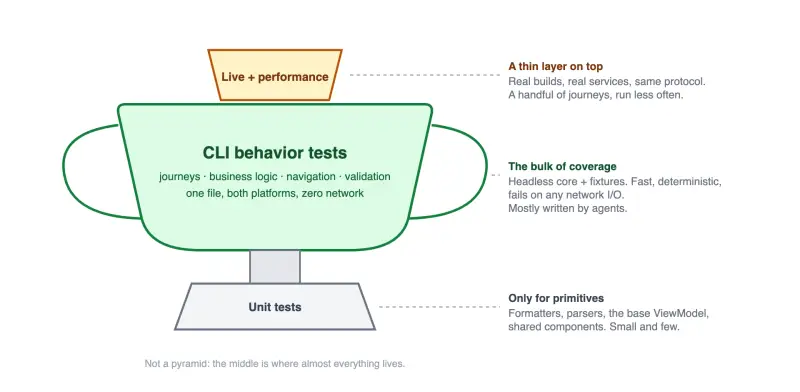
Reflex puts most coverage in CLI behavior tests. A smaller set of unit tests checks primitives and shared components such as formatters, parsers, the base ViewModel, and pagination helpers. At the top sit a handful of live integration journeys and a performance suite that drives real builds through the protocol.
The behavior tests cover business rules, input validation, navigation, error handling, and complete user journeys. They’re also the checks used at Helix checkpoints: work doesn’t advance until the relevant CLI tests pass on iOS and Android. The test layer therefore connects the coding workflow to the cross-platform parity rule.
Each behavior session installs a guard that blocks HTTP requests from the host process and fails if the app attempts one—even when the app catches the resulting error. Network calls and other external inputs must have fixtures. That makes the suite deterministic and free of network I/O, but it can mean a single journey needs many GraphQL response fixtures. The authors say the setup is tedious for people to maintain and manageable for agents.
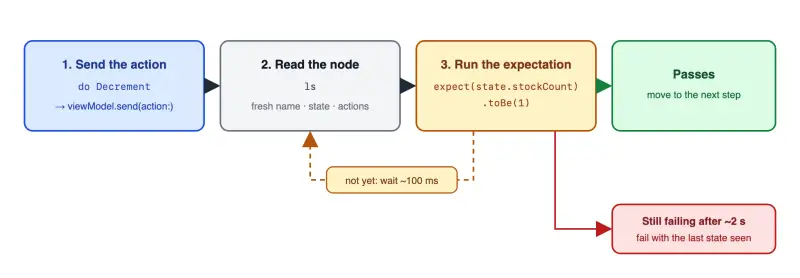
The team’s test SDK is built on Bun’s test runner and speaks the same JSON protocol as the CLI. It adds two helpers: precondition, which waits for the expected node to become focused, and do, which performs an action and waits for a condition on the resulting state. Both poll for a short period and report the last observed state if they time out, avoiding fixed sleeps and “wait for element” operations.
Tests are written as journeys rather than as a separate case for every small assertion. A failure identifies the step, action, expected state, and observed state, which the team considers enough detail for an agent to trace the problem. Scenarios that need different setup, such as a failed save, still get their own fixtures and tests.
After a warm-up, Shopify reports that an example behavior test runs in a couple of hundred milliseconds on both platforms without a device. The same test takes around two seconds in an iOS simulator. Those figures illustrate the team’s comparison; actual timing will depend on an app’s core, fixtures, and build environment.


What the approach checks—and what it doesn’t
ViewModel tests can cover much of a screen’s meaningful behavior: decisions, validation, service results, and navigation. They don’t establish that a control is laid out correctly, that a screen matches a design, or that a visual detail renders as intended. Shopify handles that separately through visual review at Helix checkpoints and screenshot tests for selected components. The team also says employees use the app daily, adding routine hands-on exposure.
That separation matters when comparing Reflex with Appium or agent-driven device automation. Device tools remain useful for flows that need a real interface or device behavior. Reflex gives an agent direct access to state instead of asking it to infer what the app is showing from accessibility data or a screenshot. That can cut interaction steps, while headless execution makes running large numbers of behavior scenarios practical.
It also gives agents a way to explore beyond tests already written: they can inspect the current node, see the available actions, and move through the app. The authors see that as useful for debugging and feature work as well as automated checks. A test suite can tell a team whether known journeys still work; an explorable state-and-action interface gives an agent a way to investigate other parts of the app.
Adapting Reflex to another app
There isn’t a standalone Reflex library to install. The authors say Introspection Kit is tied to their session model, navigation, and fixture formats, so those pieces wouldn’t transfer cleanly to another codebase. Their claim is that the reusable part is the architecture, which an agent can implement to fit a team’s own app and language.
The work starts by separating platform code from a core that can build on macOS or the JVM. Every ViewModel then follows the same pattern: actions enter, state comes out, one reducer changes it, and services arrive through the constructor. An introspection node describes the state and available actions as JSON, and the app root and navigation containers join screen nodes in a tree.
To make behavior checks deterministic, teams also need fixtures at every external boundary and a guard that fails on unexpected network access. Agent instructions should explain how to run the CLI, add fixtures, and name tests. The CLI can only help if agents know when and how to use it. Keeping the command surface small is part of that design: the goal is a fast, machine-readable feedback loop, not a terminal product for people to operate by hand.
Reflex’s strongest case is where teams maintain two native apps and want agents to help build both. Its core bet is that a shared behavioral contract and suite can preserve parity while each platform keeps its own implementation. The next thing to watch is how well that contract holds as apps add more device-specific behavior: the architecture depends on keeping those boundaries explicit, and visual verification still has to happen elsewhere.


