How to Check Websites and Social Accounts as AI Makes Fakes Harder to Spot
- David Martinez
- 937 reads
AI tools make convincing fake sites and accounts easier to create. Check URLs, trace claims, and treat emotion driven posts and detectors with care.


Checking whether a website or social account is genuine now takes more than spotting a typo or a blurry image. AI tools can help create polished pages, realistic posts and convincing interactions, while feeds reward material that draws attention. The practical response is to verify both the place a claim comes from and the claim itself.
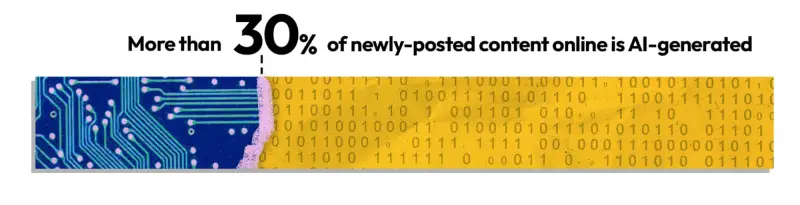
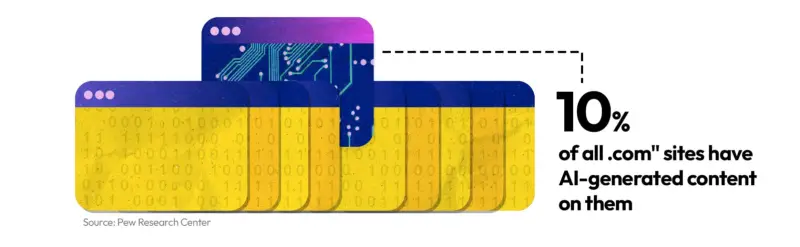
A Pew Research study found that roughly one-third of recently published web content is AI-generated. About 10 percent of .com sites have AI-generated material, according to the same source. Meanwhile, fabricated local news sites have outnumbered real local news publishers, and AI tools are helping them grow.
Those figures don't mean every unfamiliar page is deceptive. They do show why a polished appearance is weak evidence of credibility. A genuine platform can host misleading posts, and a real person can share inaccurate material. The useful question is not just whether an account exists, but what its content is trying to do and whether independent sources support it.
Why fakes have become easier to produce
Donnie Hasseltine, chief information security officer at Arkstone Defense, says convincing misinformation and deception once required the resources of large organizations. Now, a person can build a fake site, create automated accounts or spread a misleading claim with far less effort.
Zohaib Ahmed, CEO of deepfake detector Resemble.AI, points to the availability of increasingly capable AI models and tools, including open source options, alongside reduced content moderation on some platforms. These tools can produce text, images and video at a scale that makes manual review harder. Ahmed describes the situation as a “Wild West”: some tools lack safeguards that could help establish whether material is authentic.
Affordable scam kits package much of the work. Ahmed says they can cover advertising, social posts, blog content, product features, video calls and image uploads. For a few hundred dollars, a scammer can create a lookalike site, a convincing sign-in page and activity that makes the operation appear established.
Lookalike domains are one common use. A slightly altered address can imitate a familiar news site, organization, shop or betting service. The trick may involve a swapped character, a symbol that resembles a letter, or a non-English character that looks nearly identical to one in the Latin alphabet. On social platforms, lookalikes can appear as accounts posing as real people, questionable shop links that lead elsewhere, or links posted in gaming chats by accounts users believe they know.
Older visual clues are less dependable, says Eyal Elazar, head of market intelligence at e-commerce security company Riskified. AI can tidy misspelled text, improve image quality and produce more natural sounding video. A page that looks professional may still be fraudulent, and a video that sounds fluent may still mislead.
Start with the address and account
For a website, inspect the full URL before entering a password or payment details. Check for misspellings, unexpected punctuation and characters that resemble familiar letters. Hover over a link to reveal its destination, or copy the address into a place where you can read it in full before opening it.
Check that the connection uses HTTPS and that the browser reports it as secure. In Chrome, for example, selecting the control beside the address can show the connection status. These indicators protect the connection and help identify some problems, but they don't prove that a site itself is honest. A scam page can also use HTTPS.
If an address still seems questionable, search for it independently. You can check a page through Google's site status tool or scan it with a URL checking service. Browser warnings deserve attention. If you don't know how you arrived at a site, don't dismiss a warning simply to continue.
Social accounts need a different check. Look at the profile itself rather than relying on how a name or badge appears in a feed. Platforms may allow unusual characters in display names, and some sell verification badges. A badge can indicate something about an account's status on that platform, but it doesn't establish that every post is accurate. Check account history, linked pages and independent references. If the profile identifies AI-generated material, treat that label as useful context, while remembering that labels may be absent or incomplete.
Check the claim, not just the account
A secure connection and a genuine profile won't protect you from misleading content posted on a legitimate service. Ron Kerbs, CEO of fraud prevention company Kidas, compares relying on one defense to closing a door while someone enters through a window. Verification works best in layers.
One useful routine is the SIFT method, developed by misinformation researcher Mike Caulfield. Stop before sharing. Investigate the source. Find other coverage. Trace the claim back to its earliest available origin. The last step matters: a post may repeat a claim without showing where it came from, while later copies can make an unsupported statement look widely confirmed.
Another approach is “zoning,” recommended by the News Literacy Project. First identify what kind of material you are looking at and what it is meant to accomplish. Is it reporting intended to inform, opinion meant to persuade, or an advertisement meant to sell? Chuck Salter, the organization's president and CEO, argues that understanding a post's purpose should come before deciding how much to trust it.
Then read laterally: search for the account, site or claim in other places and see what independent sources say. This works for social profiles as well as articles. Before resharing a post, find out whether its claims appear elsewhere and whether those sources provide evidence. A large following or a busy comment section tells you that people are engaging; it doesn't establish that they are right.
Fact-checking organizations can help when a claim has already attracted attention. Options include Snopes, FactCheck.org, Poynter's fact-checking resources and NewsGuard's AI False Claims Monitor. Treat these as another way to investigate, not a substitute for checking what evidence a specific claim rests on.
Keep a few everyday rules in mind
Don't treat a screenshot as proof. Roei Sherman, senior director of research at cloud security firm Mitiga, warns that fabricated screenshots can spread quickly when they pair a striking headline or quote with the name of a trusted outlet. Search for the original page or statement. If you can't find it, don't pass the image along as confirmed.
Pay attention to emotional pressure, too. Posts designed to provoke anger or panic may be bait for clicks or shares. Pause, look for the original context and avoid rewarding the post with an immediate reaction. Be especially careful when an account urges you to leave the platform for another site. That destination may have fewer protections, and the link could be designed to collect personal details or money.
Browser extensions and built-in tools can make checks faster. Resemble.AI's Deepfake Detector scans images, video and audio for signs of AI use; its free account includes four website scans per day. NewsGuard rates news sites using stated reliability criteria. McAfee WebAdvisor checks for malicious sites and phishing, while DuckDuckGo Scam Blocker flags known scam sites.
These tools offer clues, not final verdicts. Marijus Briedis, chief technology officer at NordVPN, cautions that detection systems can be wrong. A detector's result should prompt further checking, especially when the decision involves a password, payment or a claim you plan to share. The most reliable habit is to slow down, verify the destination, identify the content's purpose and look for independent evidence before acting.


