Fake FC 27 Prime Gaming Offer Steals EA Passwords and 2FA Codes
- Christopher Davis
- 695 reads
A fake FC 27 reward page copies EA’s sign-in flow to collect passwords and verification codes. Here’s how it works and what affected players should do.
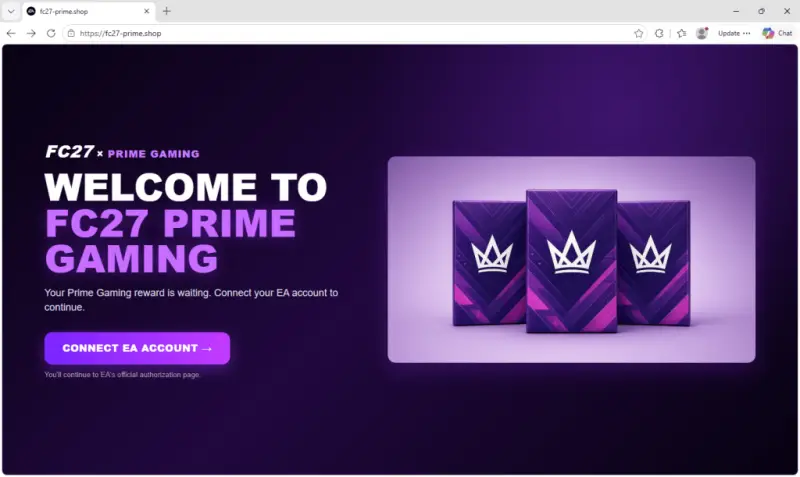
A free FC 27 player pack can be an expensive click if the page offering it asks you to sign in. A fake “FC27 x Prime Gaming” promotion copies EA’s login flow and sends players’ email addresses, passwords, and two-factor authentication codes to a server controlled by the site’s operators. The promised reward isn’t there; the credentials may put an EA account at risk.

The page appeared after EA SPORTS FC 27 launched on September 25. It borrows Prime Gaming’s branding and tells visitors their reward is waiting. Prime Gaming offers games and in-game items to Amazon Prime members, making the pitch familiar to players who already use the service. But the page’s “connect” button doesn’t take visitors to EA’s sign-in service. It leads to a counterfeit form hosted on the same suspicious domain.
That distinction matters in Ultimate Team, where player cards, coins, and progress can accumulate over time. An EA account can also provide access to purchased games and saved payment methods. Someone who takes over an account could disrupt access to those assets and use the account to contact gaming friends with deceptive links.
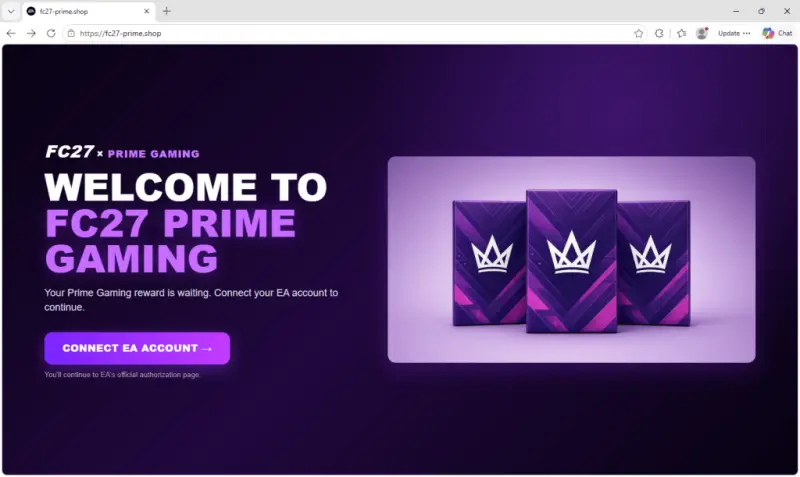
The reward page keeps visitors on its own domain
The landing page uses a dark purple, game-promotion style and promises that a Prime Gaming reward is ready. A button invites the visitor to connect an EA account, while smaller text claims the next step will be EA’s authorization page.
Clicking the button briefly displays “Connecting…” and “Redirecting to EA authorization…”. After a fixed 1.4-second delay, the browser moves to an /in path on the same domain. The pause and message create the impression of a handoff, but the address doesn’t change to an EA domain.
A familiar login layout hides the data collection
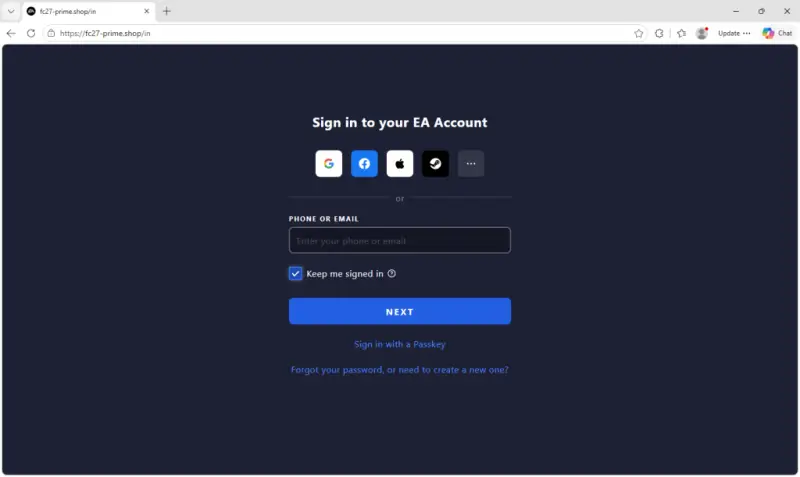
The next page imitates EA’s sign-in screen. It includes a “Phone or Email” field, a “Keep me signed in” option, a passkey sign-in choice, and buttons bearing Google, Facebook, Apple, and Steam names. Those social sign-in buttons don’t work. The page directs visitors to enter an email address and password instead.
Each submitted item is sent to fedserv.thenewsip[.]site. After the password is submitted, the site uses the server’s response to decide whether to display an EA-style incorrect-credentials message or continue to another step. That behavior is consistent with checking the supplied credentials, though the captured page code alone doesn’t show exactly what the server does with them.
For accounts with two-factor authentication enabled, the next screen asks the user to choose “Send Code” and enter a six-digit verification code. That code is sent to the same server. A valid code could let an attacker complete a login before the code expires. Two-factor authentication remains enabled, but a code entered into this counterfeit form can still be used to get past the check for that login attempt.
Accounts without two-factor authentication skip the code screen. After collecting the requested details, the page sends visitors to EA’s real Ultimate Team web app. Reaching the real site afterward doesn’t make the earlier sign-in legitimate.
Tracking features reveal how the page was built
The page also records how visitors arrived. It recognizes Facebook, Messenger, Meta’s Audience Network, Instagram, and TikTok using link parameters and ad-click identifiers such as fbclid and ttclid. Other visits are labeled “direct” or “unknown.” This shows the kit can attribute traffic to social platforms; it doesn’t establish that the operators actually ran ads there.
The code includes support for Umami web analytics, but whether that feature was enabled depends on a separate settings file that wasn’t captured. In the default mode, server responses determine whether later actions, such as entering a password or submitting a code, appear in statistics. The page where visitors enter a security code isn’t included in page-view tracking. A setting can instead count every page.
Other details suggest the site was configured to stay out of casual view. Its HTML asks search engines not to index or archive it, with a comment calling it a “Private team tool.” Its privacy and terms pages describe an authentication portal for internal use. The kit can also hide the Prime Gaming landing page and show a plain counterfeit EA login, or choose whether visitors end up at EA or a page claiming they’ve enrolled for weekly FC 27 rewards. In the captured version, the Prime Gaming lure and the redirect to EA were enabled.
What players should do
Start at ea.com by typing the address into the browser, then navigate to the account sign-in from there. Before entering a password or verification code, check the address bar: EA sign-in should be on ea.com or a genuine subdomain such as accounts.ea.com. A convincing logo and layout don’t verify who controls a page. A password manager can help because it generally won’t autofill credentials on an unrelated domain.
Keep verification codes private and enter them only on an EA sign-in page for a login you initiated. Treat free packs, coins, and other rewards promoted through ads or posts with care; a sponsored placement doesn’t prove that an offer is genuine.
If you entered your details on a page like this, go directly to EA and change your password, even if you didn’t submit a code. Review trusted devices and account settings, remove devices you don’t recognize, and check for unexpected changes to your email address, linked accounts, or purchases. Keep two-factor authentication enabled. If you reused the password elsewhere, change it on those accounts too, especially your email account.
If you’re locked out, find unfamiliar linked accounts, or notice missing content, use EA’s account recovery guidance and contact EA Help. The domains identified with this activity include fc27-prime[.]shop, fc27prime[.]shop, fc27utprime[.]com, fc27utprime[.]online, fcutprime[.]online, and fedserv.thenewsip[.]site. The practical check is simple: verify the domain before entering credentials, even when the reward page looks familiar.


