Symfony 8.2 TUI Adds Tabs, Multiselect and Faster Terminal Rendering
- Javier Eguiluz
- 573 reads
Symfony 8.2 expands TUI with new widgets, safer input handling, custom rendering hooks and frame reuse for terminal applications.

Symfony 8.2 gives developers more control over how terminal applications organize content, respond to input and render changing screens. The Tui component adds tabs, collapsible sections and multi-selection, alongside APIs for custom widgets and rendering. It also reuses unchanged screen lines between frames, a practical improvement for interfaces that update often but redraw only a small portion of their content.

New ways to organize terminal screens
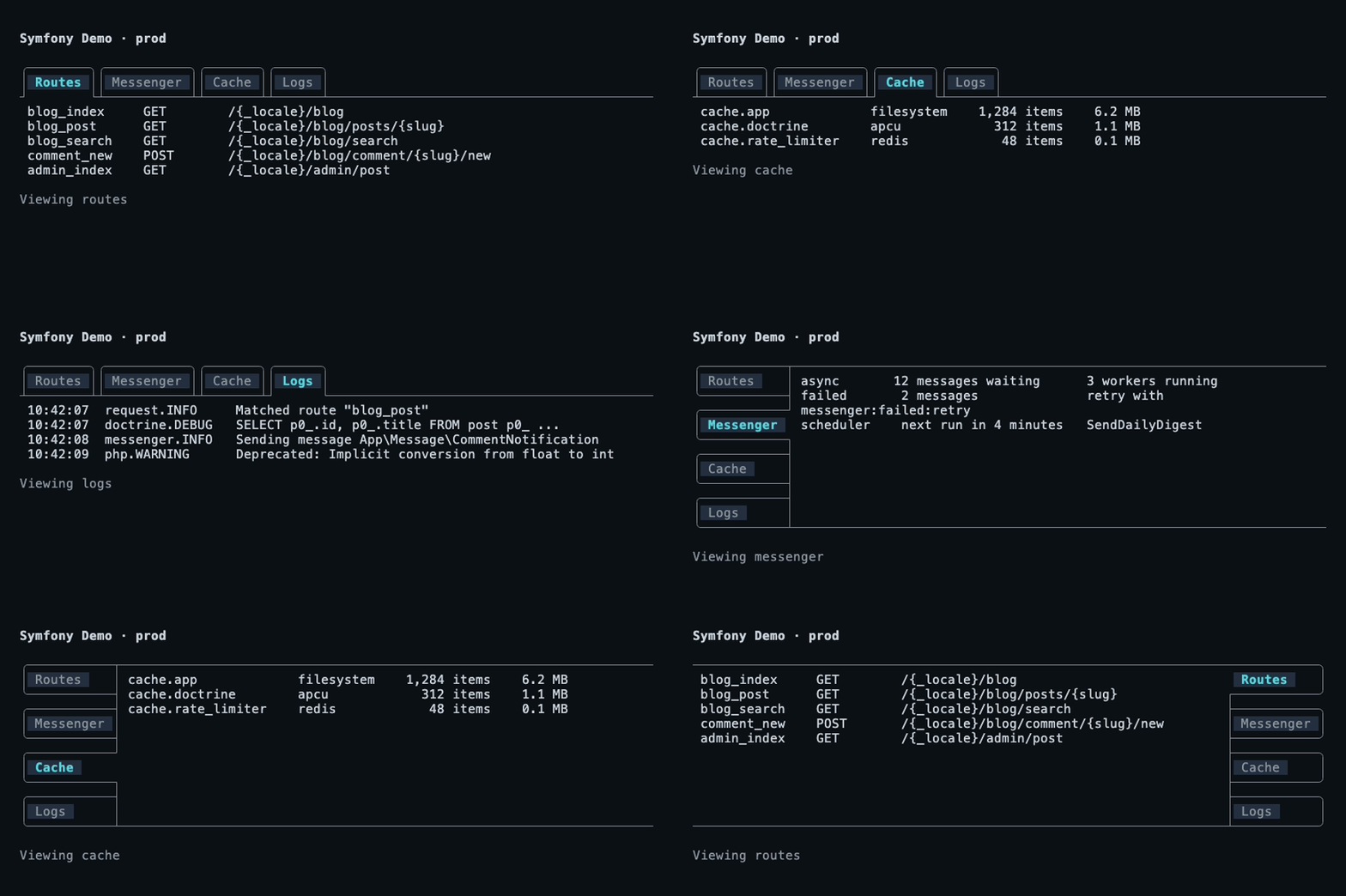
The new TabsWidget lets an application group related widgets behind a set of tab labels, showing one tab’s contents at a time. Each tab has an ID, a label and a widget. Users move between tabs with Tab and the arrow keys; Enter shifts focus into the active tab’s contents. Because only that tab is attached to the widget tree, inactive content won’t receive keyboard input or focus. Applications can also respond to a tab change with TabChangeEvent, for example to update a status line.
Headers appear above the content by default, but TabPosition can put them on the top, bottom, left or right. That gives developers a compact way to switch between views such as routes, messages, caches and logs without placing every view on one long screen.

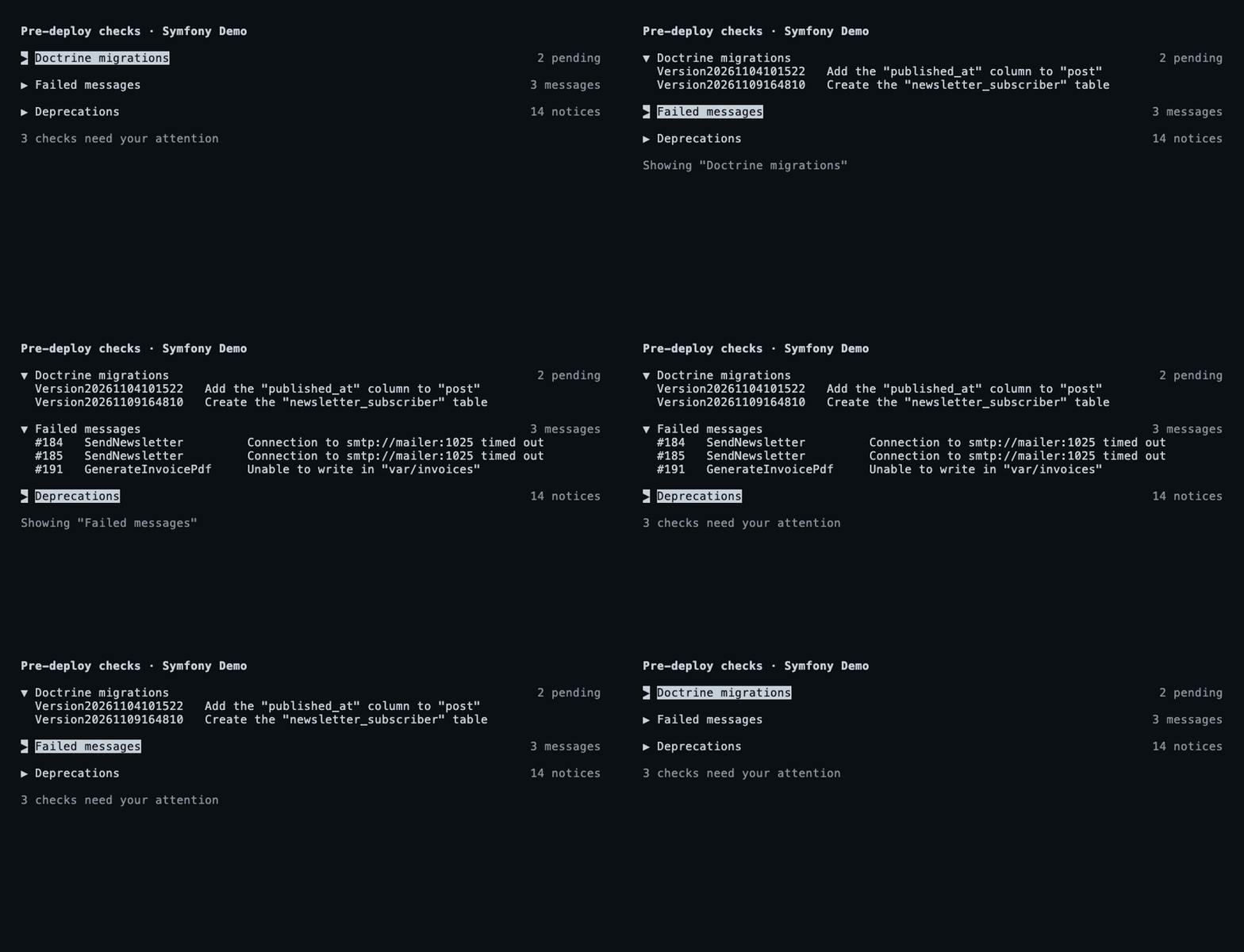
For screens that need to show detail only when requested, CollapsibleWidget keeps a summary visible and reveals its content when expanded. Developers can include an optional description in the summary, such as a count of pending items, and listen for ExpandEvent. Users expand or collapse the section with Enter, Space or the arrow keys; application code can use expand(), collapse() and toggle() to control it directly. The result is a familiar disclosure pattern for terminal interfaces, useful when a screen has several sections but only a few need attention at once.
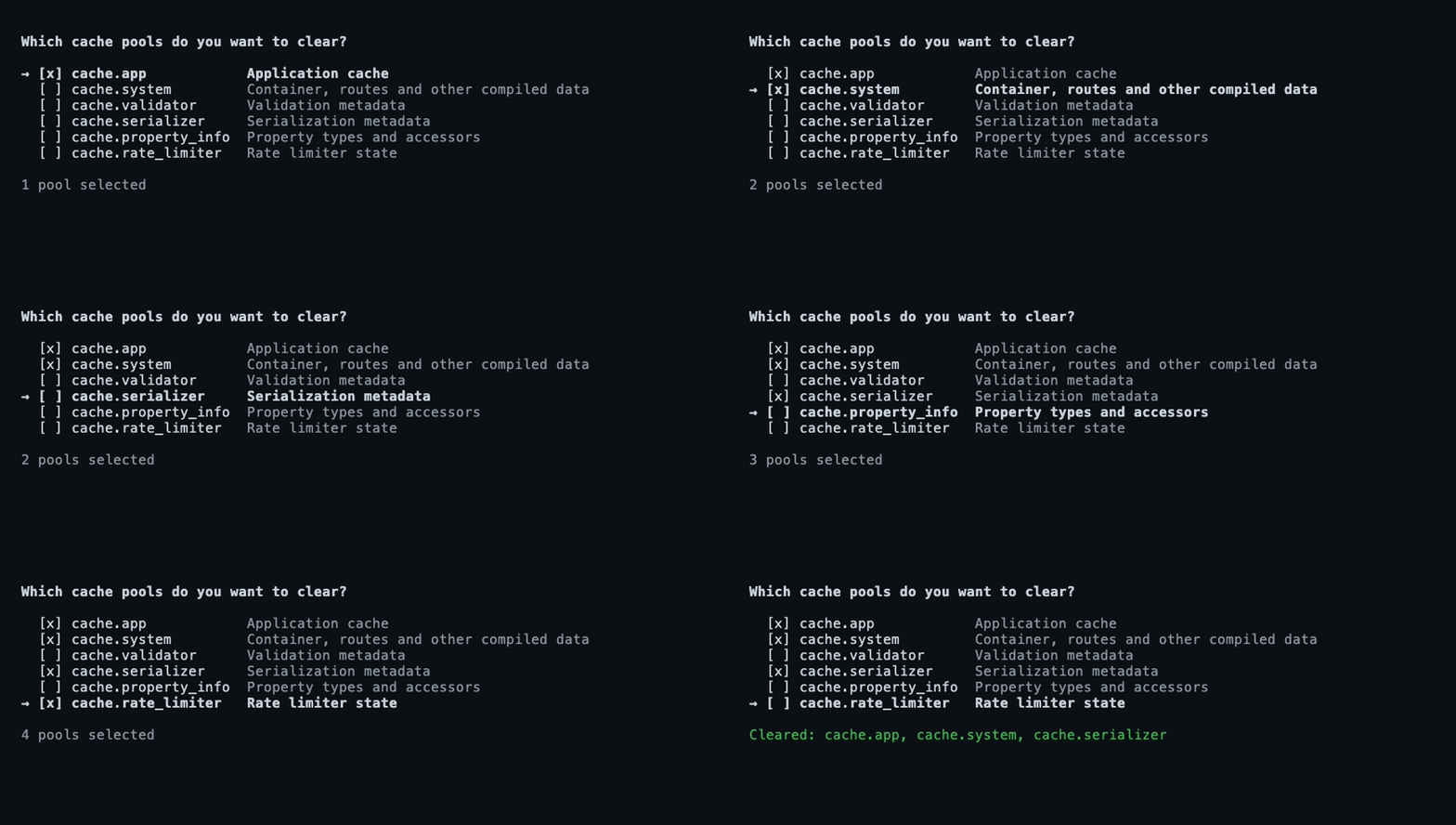
Lists can now support multiple choices as well. Set the new multiselect argument on SelectListWidget to display a checkbox beside each item. Users mark items with Space and confirm the selection with Enter; an item can also start checked. Optional descriptions add context to individual choices, and MultiSelectEvent exposes the selected values to application code.

Shortcuts that follow focus
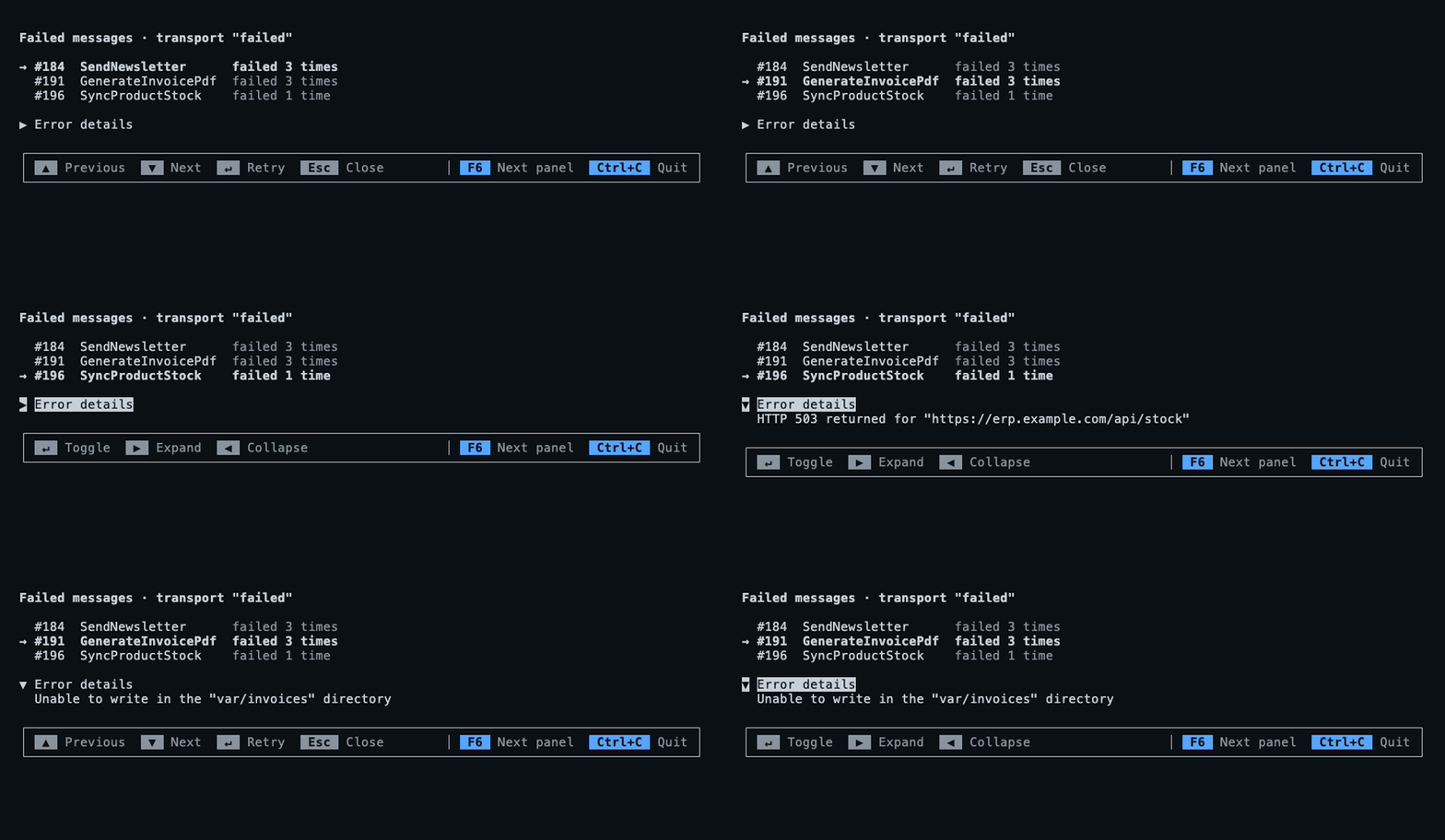
KeyBindingWidget provides a help bar for keyboard-driven applications. It displays the shortcuts available to the focused widget and changes when focus moves, so the instructions can stay relevant as users switch between a list and a collapsible panel. Developers can customize the labels for widget actions and provide global bindings, such as shortcuts for moving between panels or quitting. The widget can then sit at the end of the application layout.
More support for custom widgets
Symfony 8.2 adds public attachChild() and detachChild() methods for widgets that contain other widgets. A custom frame or split panel can use them to add a child to the widget tree, then detach and replace it when its contents change. In Symfony 8.1, this work depended on methods marked internal; the new API gives custom widget authors a defined way to manage those relationships.

Rendering also gains a post-processing hook. Tui applies padding, borders and backgrounds after a widget’s render() method runs, which previously made it hard for a widget to alter its complete displayed area. A widget can now override postRender() to modify the finished lines before they appear. That opens up effects such as dimming, masking or painting over parts of the widget.
Those lines can contain ANSI styling sequences as well as text, so editing them by character position can damage formatting. The new AnsiUtils::walkCells() method reports each part’s text, column and display width, while treating escape sequences as zero-width. That lets a widget replace visible cells while preserving styles. AnsiUtils::sliceToWidth() extracts a column range and returns exactly the requested width, including when a wide character such as an emoji or CJK character crosses the range boundary.

Input handling and widget state
Widget event listeners now persist when a widget leaves the tree. In Symfony 8.1, removing a widget also removed its listeners, which could surprise developers who temporarily hid or moved it. In 8.2, listeners remain registered until code removes them with off(). That method can remove a specific listener for an event or clear all listeners for that event.
For mouse interactions, Tui::getWidgetRect() returns the screen area occupied by a widget in the most recent render, or null if it wasn’t drawn. The rectangle provides its row, column, width and height, plus methods to check whether a screen coordinate falls inside it and convert coordinates to positions within the widget. This connects the layout’s rendered geometry to input handling, such as determining which widget received a click.

Pasting can arrive in several chunks, especially when users insert a large amount of text. The new PasteStartedEvent and PasteCompletedEvent mark the beginning and end of that operation. An application can show a temporary status message or defer processing until the paste is complete instead of treating each incoming chunk as a finished input.
Rendering and keyboard compatibility
Many terminal screens change only slightly from one frame to the next: a log gains a line, or a message grows by a few words. Symfony 8.2’s renderer reuses lines that haven’t changed instead of rebuilding and measuring them. No application changes are needed to benefit. The improvement should matter most on screens with many lines and small updates; the release notes provide no benchmark figures, so the size of the gain will depend on the application and its display.

Keybindings now support the super, hyper and meta modifiers when a terminal implements the Kitty keyboard protocol. super commonly refers to the Cmd key on macOS or the Windows key on other keyboards. Bindings can use strings such as super+k or the Key::super() helper, alongside existing modifiers.
Binding names are also checked when a Keybindings object is created. Previously, misspellings or unknown identifiers could fail to match, and in some cases could match a key without its intended modifier. Symfony 8.2 now throws InvalidArgumentException for invalid identifiers. That moves a class of input bugs from runtime behavior to configuration time, though existing applications with misspelled bindings will need to correct them.
Terminal status for long-running work
Applications can now report their state through the Program Status Protocol, OSC 7501. A program can signal that it’s working, blocked while awaiting the user, or done, and include a message and application identifier. For a blocked state, it can also provide a block kind. Terminals and multiplexers that support the protocol decide how to display the status; those that don’t support it ignore the signal.
Together, these changes extend Tui in two directions: applications get ready-made controls for common terminal interactions, while widget authors gain more reliable ways to manage children, rendered output and input state. The next practical test for teams will be how these APIs fit their existing layouts and which terminals support the newer keyboard and status protocols.


