EC2 Cost Optimization Starts With Instance Choice, Spot Capacity and Failure Handling
- Zayeem Zaki
- 734 reads
Lower EC2 spend depends on matching hardware and purchase plans to workloads, then designing ECS services to tolerate Spot interruptions.
EC2 costs are shaped well before anyone opens a billing dashboard. An instance family chosen during an early sprint can stay in place for years, even as the workload changes. The same is true of purchase commitments, load balancer behavior and where a container writes its data. Together, those choices affect both the bill and the system’s ability to keep serving requests when a node disappears.
A useful cost review therefore starts with architecture: identify the resource that limits the service, select capacity around that bottleneck, then decide how much interruption the application can absorb. For ECS services on EC2, that last step reaches into traffic draining and storage design. A lower hourly instance price has little value if losing a host drops active requests or application state.
Match the instance family to the constrained resource
EC2 instance names encode family, generation and size. In a name such as m5.2xlarge, the family indicates the broad hardware profile, the number marks its generation and the size indicates scale. The family is usually the first decision to revisit because it sets the balance between vCPU, memory and specialized resources.
- General purpose (M, T): A broad fit for web servers, internal tools and mixed workloads. The source gives an approximate ratio of one vCPU to 4 GiB of memory.
- Compute optimized (C): About one vCPU to 2 GiB, suited to CPU-heavy APIs, batch processing, media transcoding and game servers.
- Memory optimized (R, X): About one vCPU to 8 GiB, useful for caches, large JVM heaps, in-memory databases and real-time analytics.
- Storage optimized (I, D): Local NVMe storage with high random IOPS for systems such as Cassandra, ScyllaDB and OpenSearch that replicate data themselves.
- Accelerated (G, P, Inf, Trn): GPU and AWS machine-learning hardware for training and inference.
The tradeoff is straightforward: a CPU-bound service on an M family may pay for memory it rarely uses; a memory-bound service on C may need more instances to fit its working set. Profiling should precede the purchase decision. Utilization and application behavior tell you whether a workload is constrained by processor, memory, storage or another resource.
T instances need particular attention. Their burst model can suit workloads that spend much of their time at low CPU use, but a service that runs hot for hours can incur extra credit charges. In that situation, a general-purpose M instance may cost less in practice, even if the T option looked attractive at first.
For software that does not depend on x86-only binaries, Graviton is another place to begin. The source names m8g, c8g and r8g as current examples, and says Graviton4 can be up to 30% faster than Graviton3. It also puts Graviton pricing around 20% below comparable Intel and AMD instances. Those figures are claims to validate against the specific workload and region; ARM compatibility, dependencies and deployment images all matter in a migration.
Buy the baseline differently from the bursts
Once the hardware profile is right, the purchasing model determines how much of its price the workload actually pays. On-Demand capacity has no term commitment and is useful when traffic is unknown or during early benchmarking. Linux instances are billed per second, according to the source.
Reserved Instances can offer discounts of up to 72% for one or three years, but the commitment is tied to instance type, region, operating system and tenancy. Convertible Reserved Instances permit changes later, with a smaller stated maximum discount of about 66%.
Savings Plans instead commit to a dollar amount per hour for one or three years. EC2 Instance Savings Plans can reach 72% off but apply within one instance family and region. Compute Savings Plans offer up to about 66% off and cover EC2, Fargate and Lambda across regions and families. That flexibility can be useful when a service’s compute mix is likely to change. Usage above the hourly commitment remains at On-Demand rates, so a commitment should reflect a defensible baseline rather than a peak.
Spot uses spare EC2 capacity and can be discounted by up to 90%, with the tradeoff that AWS can reclaim it on two minutes’ notice. Dedicated Hosts, Dedicated Instances and Capacity Reservations address particular needs such as licensing, compliance or assured capacity in one Availability Zone. Capacity Reservations alone carry no discount: the reserved capacity is billed at On-Demand rates whether it is used or not.
For a service with a stable 24/7 floor and variable demand above it, a practical mix is to cover the baseline with a one-year Compute Savings Plan, use Spot for daily peaks and bursts, and retain a smaller On-Demand portion as a fallback when Spot capacity is scarce. That design ties the commitment to predictable usage while letting flexible work compete for spare capacity.
Spot reliability depends on using more than one pool
Spot is often described as an auction in which a higher bidder displaces a lower one. The source says that model no longer describes typical interruptions: prices move gradually with longer-term supply and demand, while AWS usually reclaims instances because it needs the hardware for On-Demand or Reserved customers in that Availability Zone. A maximum price can still be set; by default, it is the On-Demand price.
A Spot capacity pool is a particular instance type in a particular Availability Zone. For example, c8g.large in us-east-1a is a separate pool from the same type in us-east-1b, and from c7g.large in us-east-1a. A fleet restricted to one type and a narrow set of zones has few alternatives. If those pools tighten, many of its nodes can be affected together.
Allowing several compatible families and sizes gives the capacity manager more pools to choose from. The application still needs to run correctly across those types, so flexibility depends on testing rather than merely listing instance names.
The allocation strategy controls how AWS selects among the pools:
- lowestPrice chooses the least expensive pool. Other fleets may concentrate there too, leaving it more exposed to interruptions. It can suit short batch work, but is a riskier default for user-facing services.
- diversified distributes instances across the available pools. That can help long-running fleets maintain availability, though it may use more expensive capacity than necessary.
- capacityOptimized favors pools with more spare capacity, which can reduce interruptions at a possible price premium.
- priceCapacityOptimized first considers pools with ample capacity, then chooses lower-priced options among them. AWS recommends this approach, and it is a reasonable starting point for many workloads.
Drain traffic within the interruption window
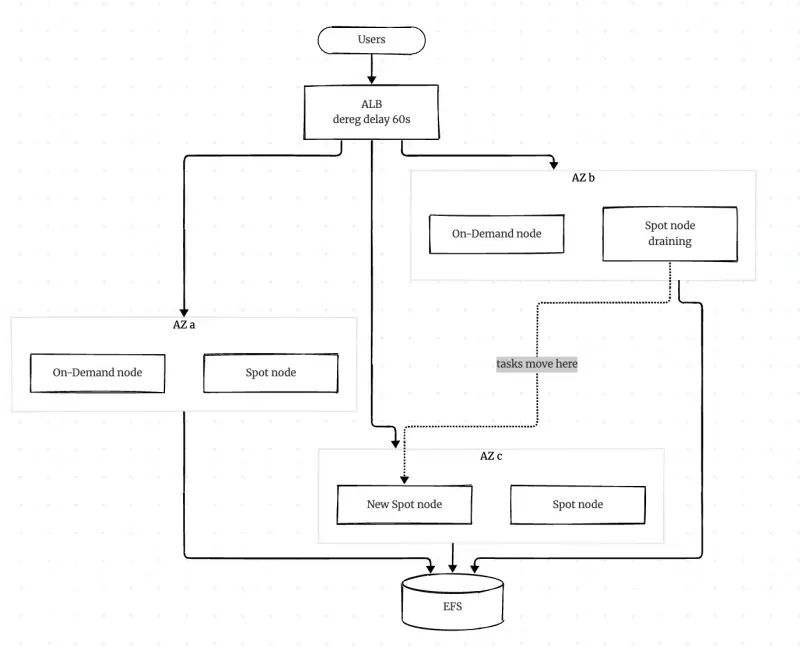
Spot instances can disappear, so services need a plan for moving work off a node before it stops. AWS provides two signals: a rebalance recommendation when an instance is at higher risk, and a two-minute interruption notice before reclamation. With Capacity Rebalancing enabled, an Auto Scaling group can start a replacement in response to the earlier signal.
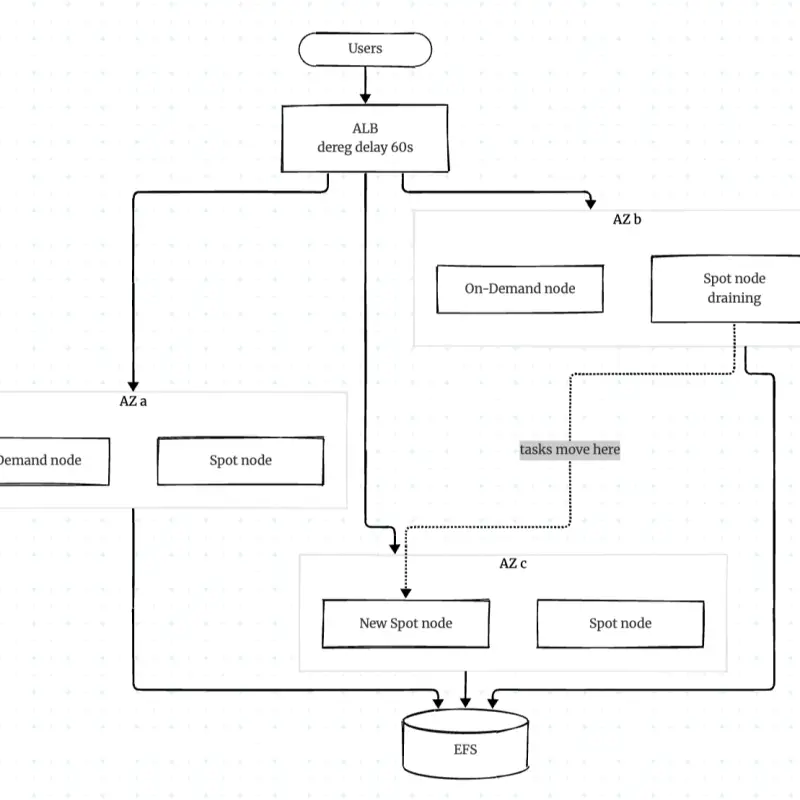
For ECS on EC2, enabling Spot instance draining tells the ECS agent to move tasks away when the interruption notice arrives. The load balancer should stop assigning new requests to the affected target while existing requests finish. The timing must fit the available window: the Application Load Balancer’s default deregistration delay is 300 seconds, longer than Spot’s 120-second notice. If the node stops before draining completes, users can see 502 errors.
Set the ALB deregistration delay and container stopTimeout to a value that fits inside the interruption window. The source recommends 60 to 90 seconds. Its example uses a 60-second target deregistration delay and a 90-second container stop timeout. These values still need to suit the application’s request duration and shutdown behavior.
Use ECS awsvpc networking for this pattern. Each task receives its own IP address, allowing the ALB to direct traffic to the task. This avoids routing through a shared host port and makes target registration align with task placement.
Keep durable data away from replaceable hosts
Data stored only on a node’s local disk goes away with that node. Instance Store is very fast, but its contents are lost when the instance stops, making it appropriate for temporary files and caches rather than durable application state.
EBS volumes survive instance restarts, but remain in one Availability Zone and attach to one node at a time. The source recommends gp3 over gp2, describing gp3 as about 20% cheaper. EFS provides shared storage across Availability Zones and tasks, so a task rescheduled elsewhere can continue to see the same files. That makes EFS a fit when Spot-backed tasks need shared file access, though teams should account for the storage service’s own cost and performance characteristics.
What the CDK example assembles
The TypeScript stack combines these choices in an ECS cluster. It creates a VPC across three Availability Zones, with one NAT Gateway and an S3 gateway endpoint. The comments explain the tradeoff: three zones expose more Spot pools, while one NAT keeps a small setup cheaper. For production, the example recommends a NAT Gateway per zone to avoid cross-zone data charges. The S3 endpoint keeps S3 traffic off the NAT path.
The cluster uses an Auto Scaling group with a mixed-instance policy and ARM based ECS optimized Amazon Linux 2023 images. Its launch template starts from c8g.large and permits c8g.large, m8g.large, c7g.large, m7g.large and r8g.large. That provides multiple instance families and generations, while the workload must still be compatible with each option.
The group has a minimum capacity of two and a maximum of 20, enables Capacity Rebalancing, and sets one On-Demand base instance. Above that base, the policy uses 20% On-Demand and therefore 80% Spot, with the price capacity optimized allocation strategy. The proportions are an example configuration; an actual service’s fallback needs depend on its tolerance for capacity shortages.
The stack adds an ECS Auto Scaling group capacity provider and enables Spot draining through CDK’s spotInstanceDraining: true option. That configures the ECS agent flag without manually appending it to /etc/ecs/ecs.config. The cluster nodes run in private subnets, leaving the internet-facing ALB as the public entry point.
For storage, the example provisions an encrypted EFS file system in general purpose performance mode with elastic throughput and a lifecycle policy that moves cold files to infrequent access after 30 days. The task definition mounts it at /mnt/shared with transit encryption enabled. Its container image is NGINX stable Alpine, with 512 CPU units, a 1,024 MiB memory limit and a 90-second stop timeout. The ECS service requests four tasks.
The ALB listener targets the ECS service on port 80, uses a 60-second deregistration delay and checks the /health path every 15 seconds, with two successful checks required for a target to be healthy. Together, the settings demonstrate the intended lifecycle: replacements can arrive early, ECS can drain tasks, the load balancer can stop new requests, and shared files remain available after a task moves.
Network charges can erode compute savings
Lower instance prices do not guarantee a lower total bill. Cross-zone traffic and NAT processing can add meaningful costs. The source gives cross-AZ data transfer as $0.01 per GB in each direction and NAT processing as $0.045 per GB. With one NAT Gateway in us-east-1a and nodes in three zones, it estimates that about two-thirds of outbound traffic incurs the cross-zone charge as well as NAT processing. A NAT Gateway per zone can avoid that path for production traffic; gateway endpoints for S3 and DynamoDB keep those services’ traffic away from NAT.
Public IPv4 addresses are another line item: the stated rate is $0.005 per hour, or about $3.65 per month, for each address, whether attached or not. Keeping cluster nodes in private subnets and removing unattached Elastic IPs helps avoid paying for addresses that serve no purpose.
The key design test is whether each cost choice survives normal failure behavior. Profile before selecting a family, reserve only the steady baseline, spread Spot demand across compatible pools, and make draining shorter than the interruption window. Keep durable state on storage that follows the task. Those decisions can reduce compute spend while making the service better prepared for a host loss; the next step is to validate the configuration against the workload’s real compatibility, request duration and traffic pattern.


